codeSpark vs Codestronauts: what comes after codeSpark for your 8–12-year-old?
codeSpark turns coding into puzzles a pre-reader can solve. Codestronauts turns it into lines a kid types, inside one story.
Short answer
Start with codeSpark; when they're ready to type, Star Catcher comes next. codeSpark is a wordless, drag-and-drop coding app for kids 3 to 10.[1]
 Codestronauts is a self-paced, story-driven coding course for kids 8–12. Kids type real JavaScript to rebuild a starship with a robot named Cody. Episode 1 is free, no card.

No card needed. Episode 1, “Wake Up, Cody,” takes about 15 minutes.

At a glance
| Codestronauts | codeSpark | |
|---|---|---|
| What it is | Story-driven coding course. Star Catcher: five episodes, around two hours. | Learn-to-code app: wordless puzzles and a game maker.[1] |
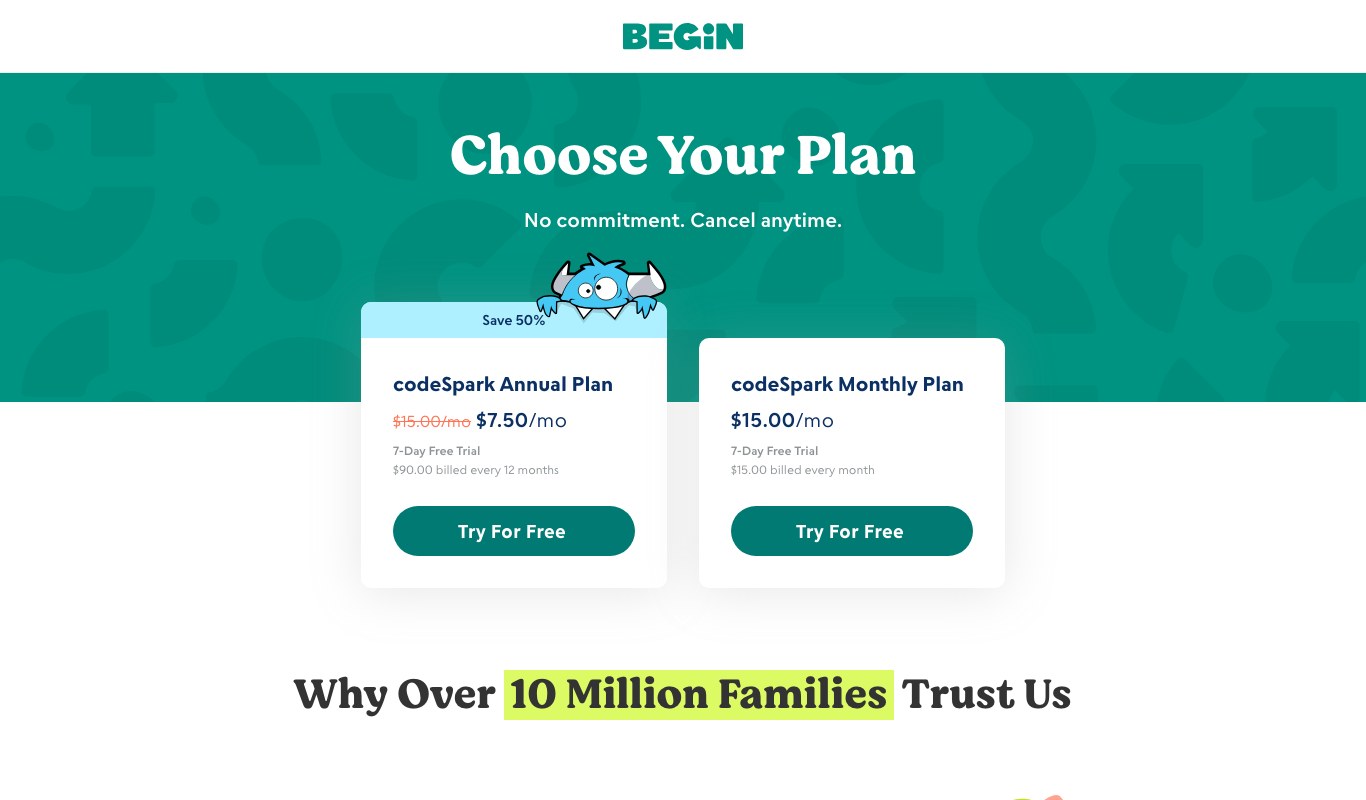
| Price | Episode 1 free, then $29.99 once for the rest of Star Catcher | $90 a year or $15 a month, on Nov 5, 2026.[2] Subscriptions renew automatically.[3] |
| What the kid types | Real JavaScript, from the very first line they type. | Nothing typed: kids drag and drop commands.[1] |
| Ages | 8–12. | 3 to 10.[1] |
| Best for | Kids 8–12 ready to type real code inside one story | Young kids, pre-readers included, learning to think in steps.[1] |
| What comes next | The next episode, to answer each cliffhanger. | New puzzles on adventure maps, plus monthly contests.[3] |
| What they make | An arcade game of their own, with a boss they design. | Their own games and stories, published for other kids.[3] |
| Help when stuck | Cody's hints first; the last one gives the line to type. | On-screen hand prompts show how to make new commands.[4] |
| Where it runs | Phones, laptops and computers, in a web browser. Nothing to install | iPhone, iPad and Android apps;[3][5] Hour of Code on the web.[6] |
| Who's in charge | Parents, with a PIN-locked Parent Corner. No ads or stranger chats. | Parents, through a dashboard; every shared game is reviewed first.[3] |
| Who makes it | Jonathan Greene, dad of two, inventor on 50+ U.S. patents. | Begin, which also makes HOMER and Learn with Sesame Street.[7] |
No card needed
Checked Nov 5, 2026. Every fact about codeSpark carries its source, listed under Sources.
The map
codeSpark for the first steps, Codestronauts for typing them
codeSpark teaches young kids to think in steps with drag-and-drop puzzles, on a monthly or annual plan. Codestronauts is an epic told one mission at a time, typed in real JavaScript, each mission paid for once.
Placed from each program's own pages, checked Nov 5, 2026.
| Real coding skill | |||
|---|---|---|---|
| How likely they stick with it | Learns the ideas in blocks | Moves from blocks to typing | Types real code, like the pros |
| A story to finish, inside an epic |  Codestronauts | ||
| A level to beat or people to share with | Scratch codeSpark | Kodable | CodeCombat Roblox Studio CodeMonkey |
| The next lesson or class | Code.org Tynker Minecraft Education | Khan Academy | |
- → Real code from day one: no wall when the blocks run out.
- ↑ They finish what they start, and finishing builds real skill.
What comes after codeSpark?
Typed code comes next. codeSpark's own page says kids 10 and up "test the limits of drag-and-drop coding" until they "feel ready to graduate".[1] The step past drag-and-drop is the keyboard.
On codeSpark, kids drag commands instead of typing lines of code.[1] If your kid swipes through anything but stalls at a keyboard, typing is the new part. In Codestronauts, typing is how the story moves.
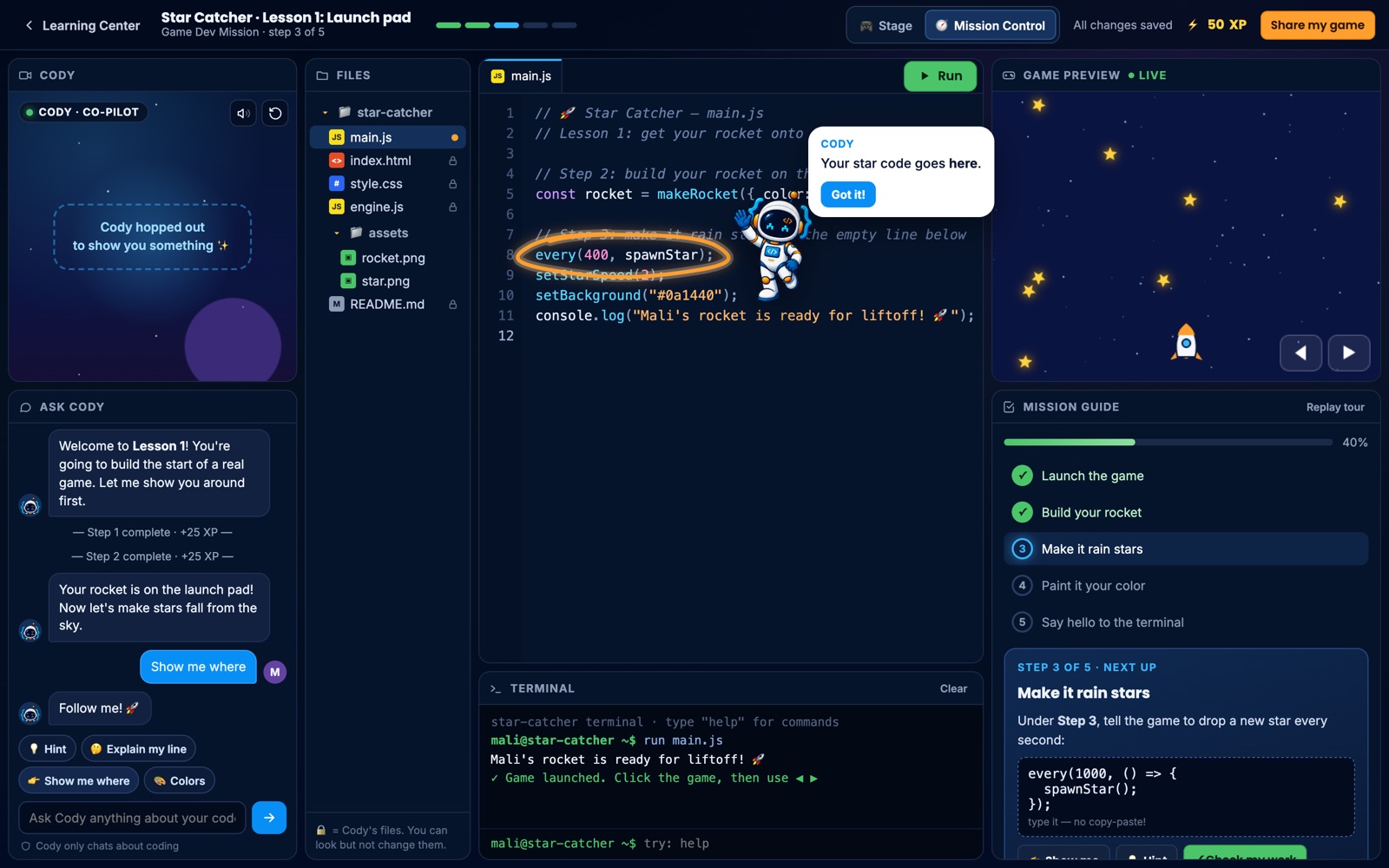
Both teach a computer to follow steps in order. A block moves codeSpark's character. A typed line flies our ship.
Coming from codeSpark? What carries over
The thinking carries over. codeSpark teaches sequencing, loops, conditionals, events and debugging.[3] Typed code uses the same ideas.
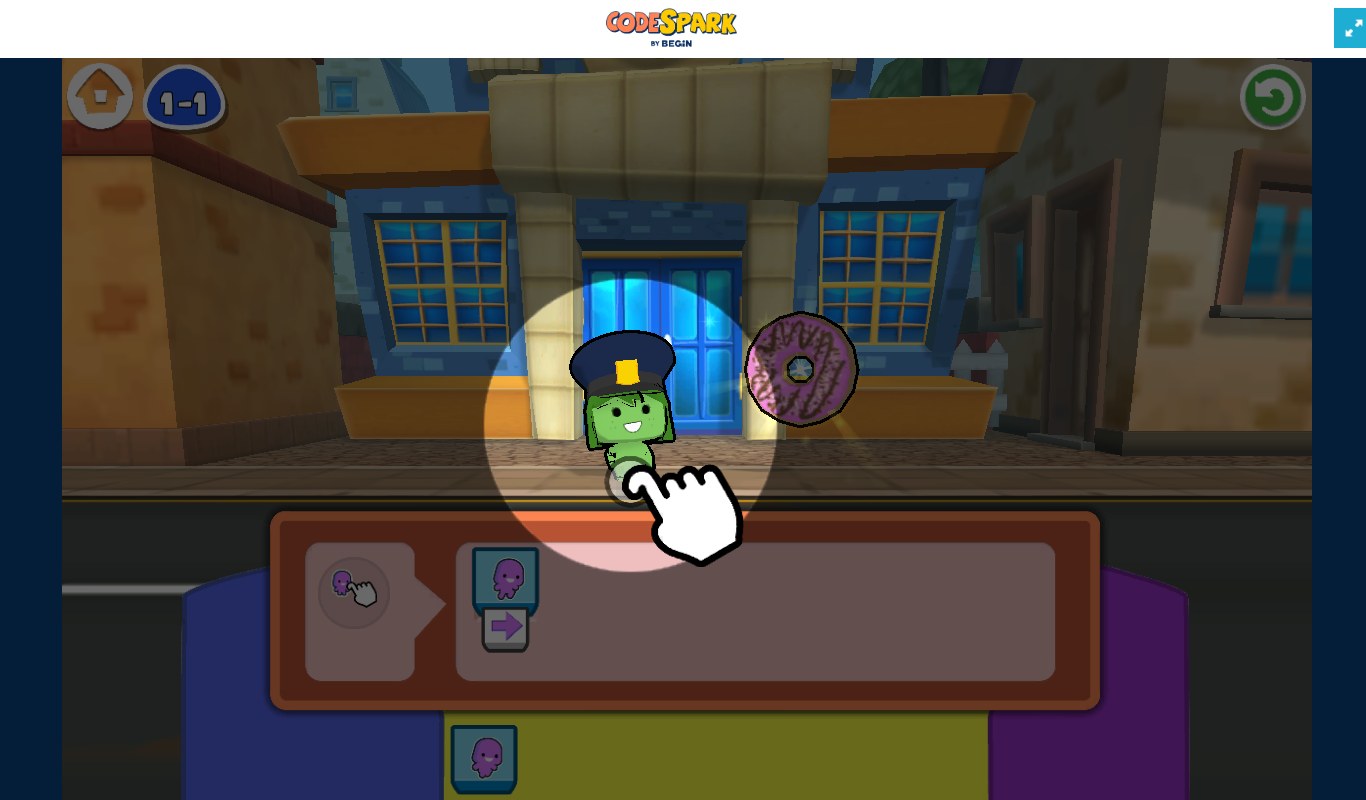
A codeSpark kid already knows that steps run in order. In puzzle 1-1, they drag one command into the program. Then the hand prompt points at the character to run it.
Run it here
The same idea, spelled out
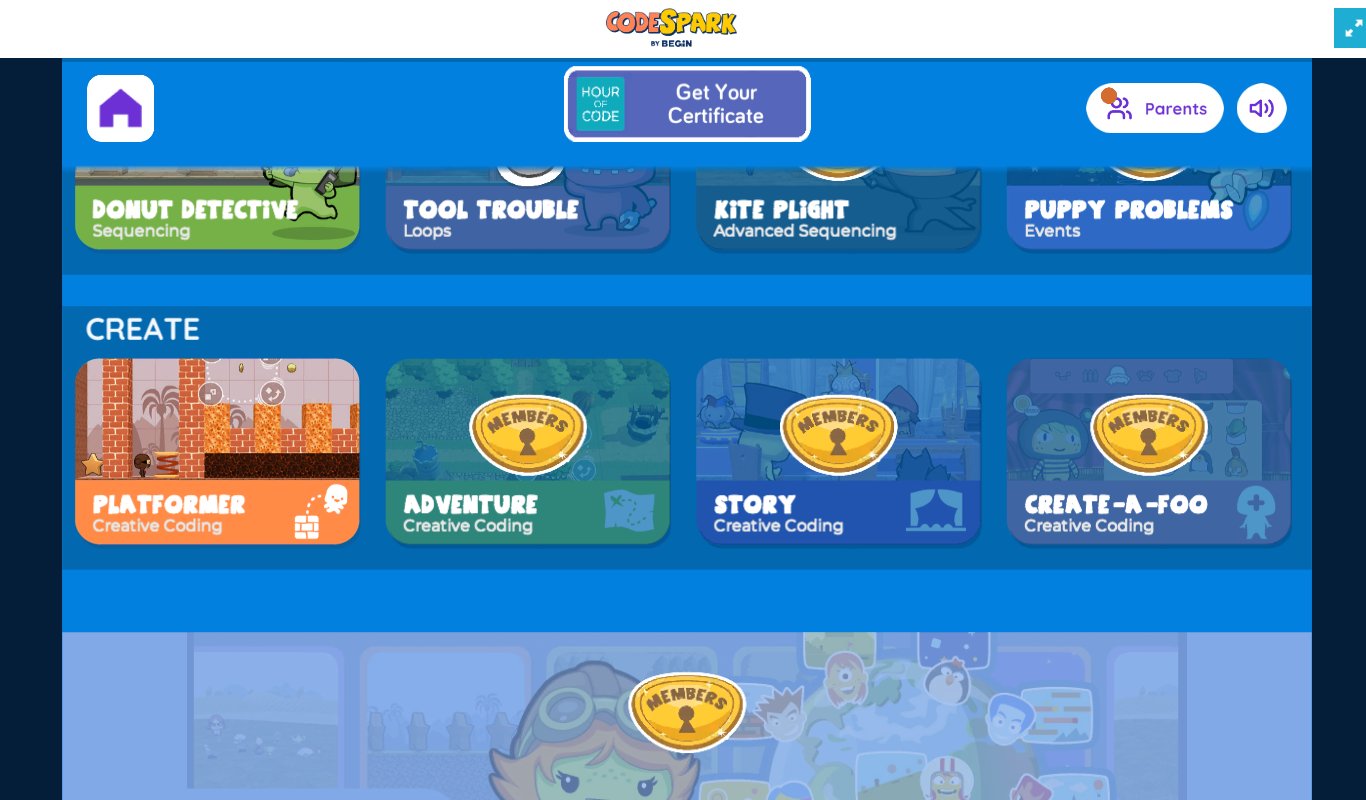
codeSpark's puzzle 1-1: one command block, with its arrow, dragged into the program.Screenshot of codeSpark's Hour of Code puzzles in a web browser, codespark.com/play, taken Nov 5, 2026.
// 🚀 THE HULL
makeRocket({ color: "blue" });

// 🌟 STARLIGHT SCANNER
every(1000, () => {
  spawnStar();
});
Change blue to red, or 1000 to 100, and press Run.
Press ▶ Run
That's Episode 1's real game engine, running your edit on this page.
No card needed. Episode 1, “Wake Up, Cody,” takes about 15 minutes.
In Star Catcher, those steps become lines your kid types. Your kid picks the ship's color, and makeRocket({ color: "purple" }); paints it. The words are new, and the logic is already theirs. codeSpark can stay on the tablet for a younger sibling.
Is codeSpark worth it?
Yes, for young kids. Its puzzles need no reading, so a preschooler can start.[1] Common Sense Media says kids "learn the logic of programming by exploring visual blocks of code".[4] It also cites an independent study: the app raised sequencing ability and confidence around problem-solving.[4]
Kids have made 64 million games with it.[1] Every game and story is reviewed before it's published.[3] One annual plan holds up to five child profiles,[3] which suits a family with a 4-year-old and an 8-year-old.
What happens on the first evening?
On codeSpark, a kid can start its free Hour of Code activities in a web browser.[6] Beside the puzzles is a game maker, where kids design and code their very own game.[6] We opened them on November 5, 2026.
In Codestronauts, the first episode is Wake Up, Cody. One line is already written. Your kid presses Run, and Cody wakes up. Soon a Glitchling chews "blue" into "bl#e". Your kid types a real color, and the bug turns back into a Tintling.
Get a line wrong, and the ship shows the mistake, often in a funny way. Cody then says why it happened. To sign up, you give your email, a password and a PIN, plus your kid's first name. No card is needed, and your kid never needs an email.
What does a year of codeSpark cost?
$90 on the annual plan, or $180 at $15 a month.[2] Those were the two plans on its website on November 5, 2026.[2] Subscriptions renew automatically,[3] and you can cancel from your account at any time.[1]
Star Catcher starts with Episode 1 free. The other four episodes are $29.99 once, and nothing renews. Siblings share them. Each new mission is its own purchase: a whole story to finish.
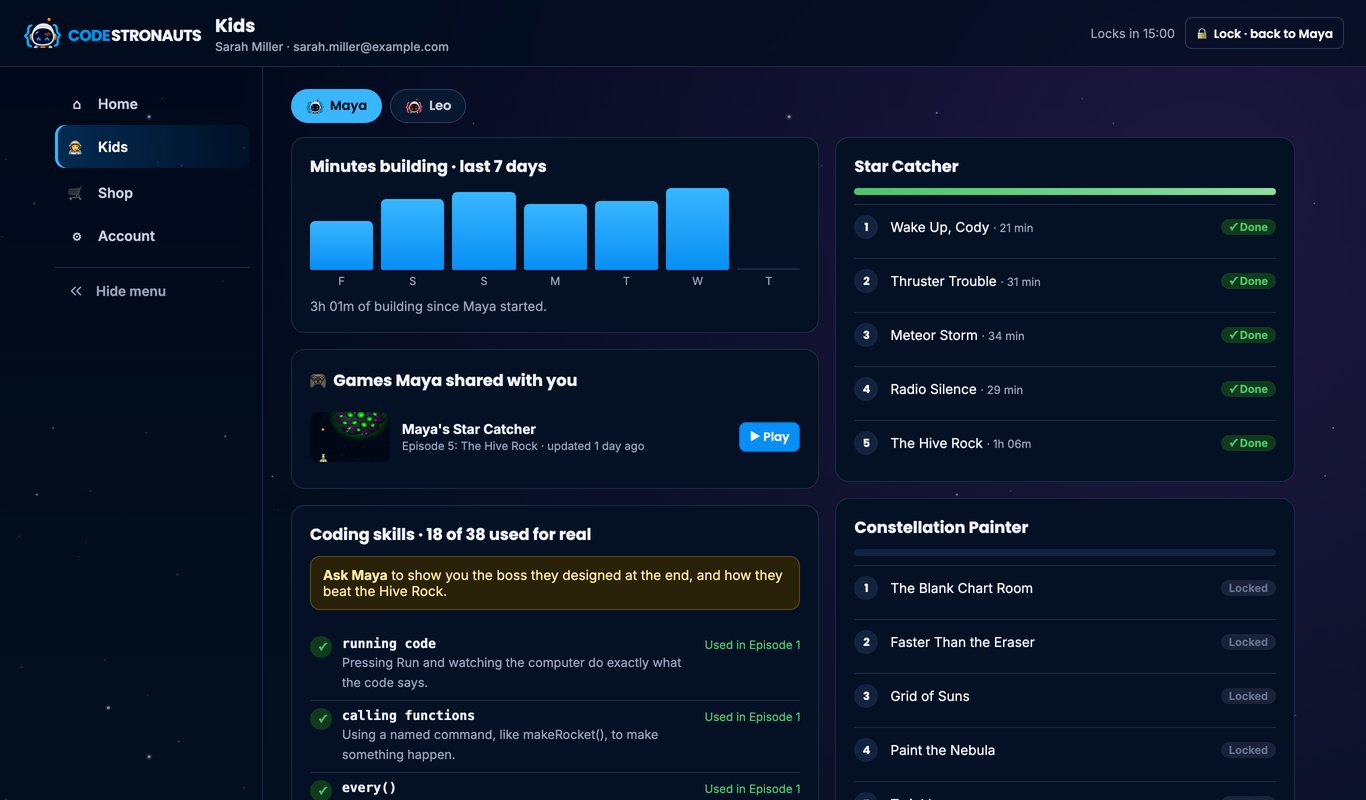
Your kid can't buy anything alone. They ask, and you say yes in the PIN-locked Parent Corner.
Questions parents ask
What age is codeSpark for?
Ages 3 to 10, by its own page.[1] Its puzzles need no reading. Codestronauts is made for 8 to 12.
Does codeSpark teach a real programming language?
Is codeSpark free?
My kid has never typed code. Can they start Star Catcher?
Yes. Their first move in Episode 1 is pressing Run. Cody explains each new word once they've seen it work. If they get stuck, hints come first, and her last one gives the line for them to type.
Where Codestronauts fits
For the codeSpark kid who's ready to type
Codestronauts picks up where the puzzles stop. In Star Catcher, your kid types real JavaScript, and each line moves the story: wake Cody, rebuild the ship, relight the Great Beacon. They finish with an arcade game whose boss they designed.
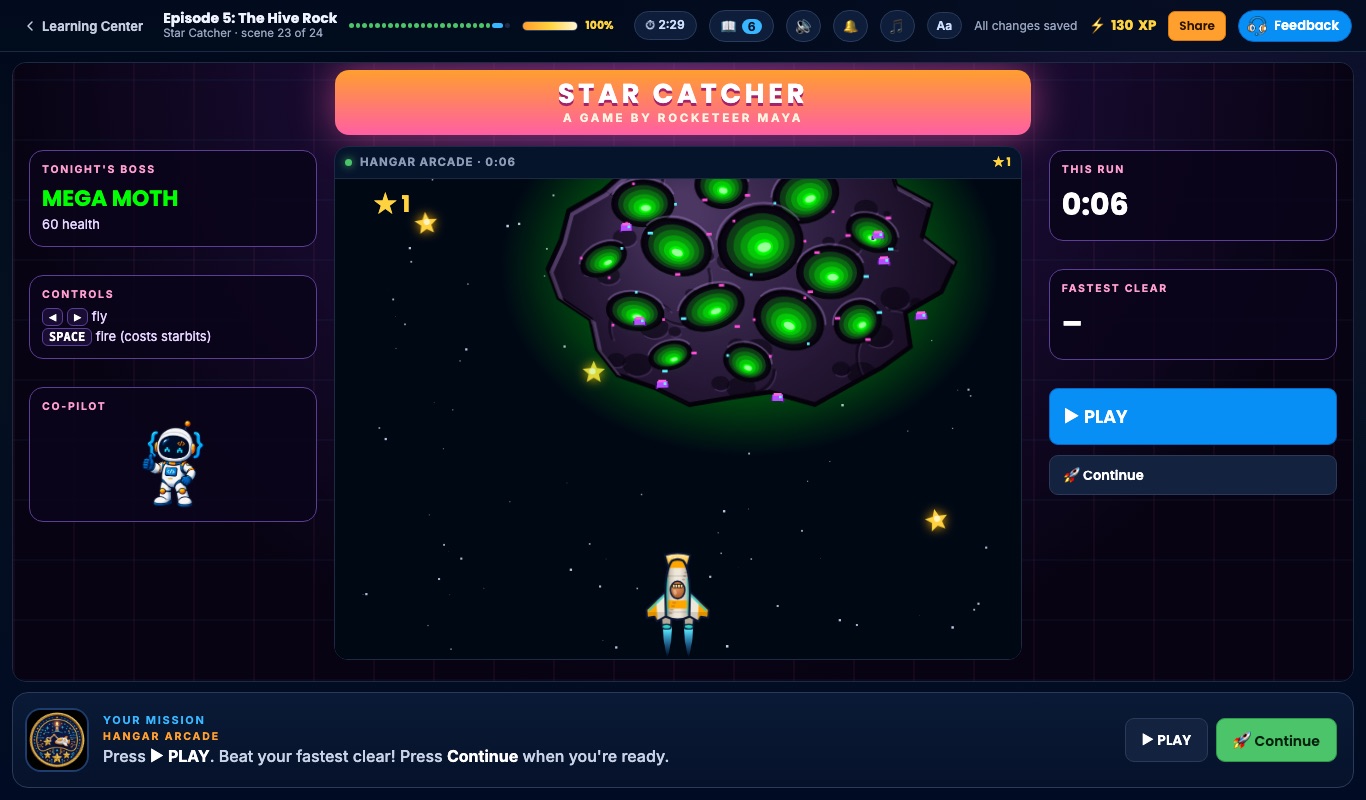
Every Codestronaut's story begins with Episode 1, and it's free. No card needed.
Was this answer helpful?
What was missing?
codeSpark alternatives parents also weigh
Scratch Code.org Tynker CodeCombat Roblox Studio Coding tutor Coding camps Live coding classes Khan Academy CodeMonkey Kodable Minecraft EducationAll fourteen side by side
From the blog
All answers SchoolMy 9-year-old can swipe through an iPad but can barely type on a laptop. When should kids learn to type?Start now. "Most research supports starting students on formal keyboarding around grade 4," says occupational therapist Theresa Tovey, and fourth-graders are 9 or 10.
 CodingMy 10-year-old has outgrown Scratch. What should he learn next?Typed code, in a tool that keeps giving him things to show. Python is the usual answer, and a good one. For a ten-year-old game builder we'd pick JavaScript, because his games open in any web browser.
How we compared
We make Codestronauts. We opened each product and took these screens on the dates shown. Each fact about the other program links to its own pages. Something out of date? Write to hello@codestronauts.com and we'll fix it. codeSpark belongs to its owner, which has no tie to Codestronauts.
Sources
- codeSpark, the #1 Learn-to-Code App for Kids 3-10, Begin (codeSpark). Read Nov 5, 2026 ↩
- codeSpark plans: the offers behind Begin's plan page (beginlearning.com/v2/onboarding/codespark-digital/plan-selection), Begin (codeSpark). Read Nov 5, 2026 ↩
- codeSpark - Coding for Kids, Apple App Store. Read Nov 5, 2026 ↩
- codeSpark Academy: App Review, Common Sense Media. Read Nov 5, 2026 ↩
- codeSpark - Coding for Kids - Apps on Google Play, Google Play. Read Nov 5, 2026 ↩
- Hour of Code - Coding for Kids | codeSpark, codeSpark. Read Nov 5, 2026 ↩
- About Begin, Begin. Read Nov 5, 2026 ↩
- Scratch | Scratch Foundation, Scratch Foundation. Read Nov 5, 2026
- Computer Science for Students | Learn, Explore, and Create with CodeAI, CodeAI (formerly Code.org). Read Nov 5, 2026
- Coding For Kids, Kids Online Coding Classes & Games | Tynker, Tynker. Read Nov 5, 2026
- About CodeCombat, CodeCombat. Read Nov 5, 2026
- Luau, Roblox Creator Hub. Read Nov 5, 2026
- Introducing Khan Academy's New Intro to Computer Science Course with Python, Khan Academy Blog. Read Nov 5, 2026
- Coding for Kids | Game-Based Programming, CodeMonkey. Read Nov 5, 2026
- Coding & Typing Apps for Kids Ages 4-10 | Kodable, Kodable. Read Nov 5, 2026
- Computer Science | Minecraft Education, Minecraft Education (Mojang and Microsoft). Read Nov 5, 2026