Tynker vs Codestronauts: is Tynker worth it for your 8–12-year-old?
Tynker places your kid on a path of levels, with electives to pick from. Codestronauts is one story, typed line by line to its end.
Short answer
Yes, if you want range. Tynker is blocks first for ages 5 to 18, $180 a year on sale, November 2026.[1] A placement test and six levels set the path.[2][3]
 Codestronauts is a self-paced, story-driven coding course for kids 8–12. Kids type real JavaScript in one story, rebuilding a starship with a robot named Cody. Episode 1 is free.

No card needed. Episode 1, “Wake Up, Cody,” takes about 15 minutes.

At a glance
| Codestronauts | Tynker | |
|---|---|---|
| What it is | Story-driven coding course. Star Catcher is five episodes, about two hours. | Coding course library: 70+ courses and 5,000+ lessons.[1] |
| Price | Episode 1 free, then $29.99 once for the rest of Star Catcher | $54 a quarter, $180 a year or $468 once for its Lifetime plan, each shown as 40% off on Nov 5, 2026. Quarterly and yearly renew by default.[1] |
| What the kid types | Real JavaScript, from the first line they type. | Blocks first, then text languages like JavaScript and Python.[2] |
| Ages | 8–12. | 5 to 18, by its pricing page.[1] |
| Best for | Kids 8–12 ready to type real code inside one story | Range, with many courses across ages 5 to 18.[1] |
| What comes next | The next episode answers each cliffhanger. | The next level or an elective.[3] Most courses carry a storyline.[4] |
| What they make | Their own arcade game, with score, levels and a boss they design. | Apps, games and art, plus Minecraft add-ons, skins and mods.[1] |
| Help when stuck | Hints first; Cody's last hint gives the line, and they type it. | Self-guided courses with built-in tutorials and step-by-step instructions.[1] |
| Where it runs | Phones, laptops and computers, in a web browser. Nothing to install | Any computer with a modern browser, plus three mobile apps.[1] |
| Who's in charge | Parents, in a PIN-locked Parent Corner. No ads or stranger chats. | A parent dashboard with mastery stats, and a moderated community.[1] |
| Who makes it | Jonathan Greene, dad of two, an inventor on 50+ U.S. patents. | CodeHS, which acquired Tynker in May 2025.[5] |
No card needed
Checked Nov 5, 2026. Every fact about Tynker carries its source, listed under Sources.
The map
Tynker for range, Codestronauts for one story
Codestronauts is an epic told one mission at a time, each mission paid for once. Tynker is a library of courses, sold as quarterly, yearly or lifetime plans.
Placed from each program's own pages, checked Nov 5, 2026.
| Paying for progress, not time | |||
|---|---|---|---|
| How likely they stick with it | Paid by the hour, class or week | Subscription plans | Per result: something they built |
| A story to finish, inside an epic |  Codestronauts | ||
| A level to beat or people to share with | CodeCombat CodeMonkey Kodable codeSpark | ||
| The next lesson or class | Tynker Minecraft Education | ||
- → Pay for what they build, not for weeks they skipped.
- ↑ They finish what they start, and finishing builds real skill.
Tynker free vs paid: what each plan costs
Tynker's free Basic plan stops after the first three lessons,[3] and its Hour of Code activities are free too.[6] A paid plan opens the rest. The paid plans were all 40% off when we checked.[1]
- Quarterly: $54, which is $18 a month
- Yearly: $180, which is $15 a month
- Lifetime: $468, paid once
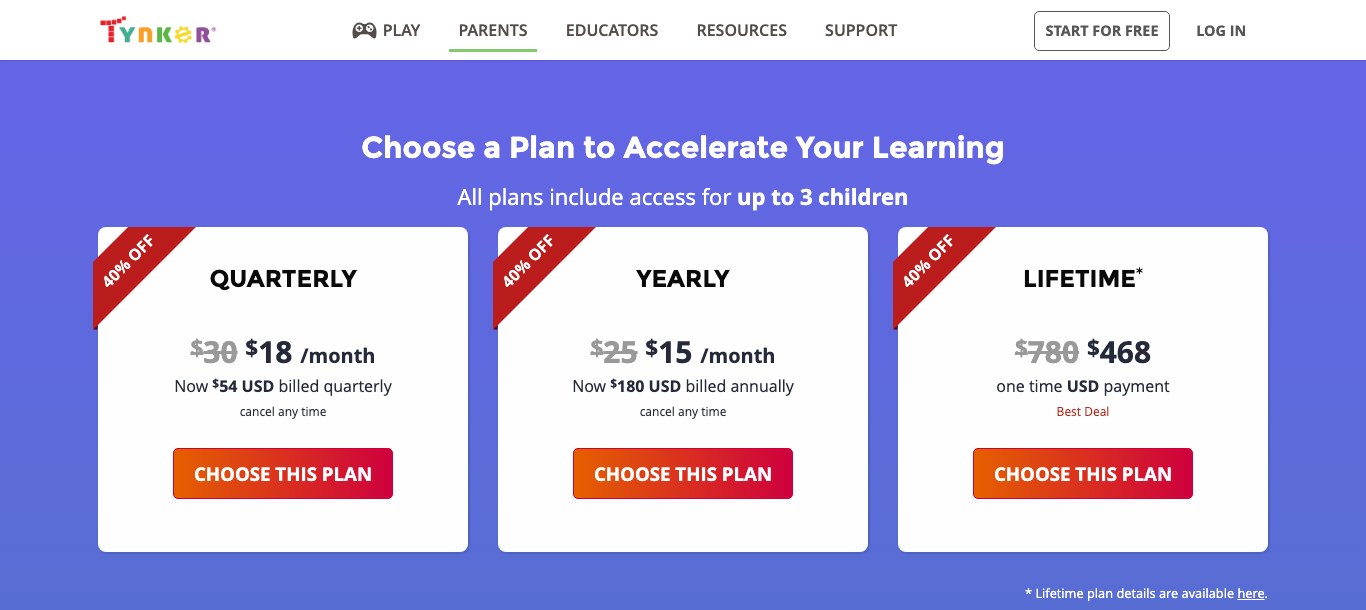
Each plan covers up to three children.[1] Quarterly and yearly renew until you turn them off.[1]
Codestronauts starts at nothing. The rest of Star Catcher is one payment of $29.99, nothing renews, and siblings share it.
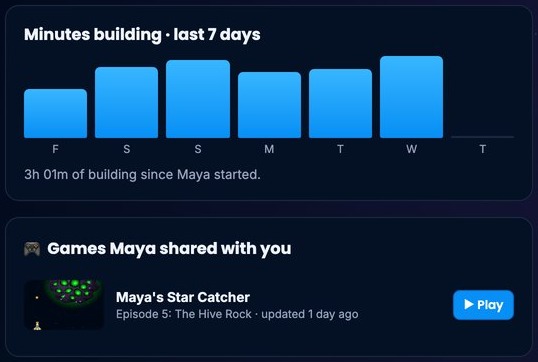
Your kid can't buy anything alone. They ask, and you approve it from the Parent Corner.
Coming from Tynker? What carries over
Nearly all of it carries over. A Tynker kid already knows that a program is a list of steps the computer runs in order.[3]
In Space Quest, they snap a walk block under on start.[6] Press Tynker's JS button, and that block reads walk();.
In Codestronauts, that same idea is a line your kid types. In Episode 1, bugs chew the ship's color into "bl#e". Your kid types a real color, and makeRocket({ color: "gold" }); puts it right.
Run it here
The same idea, spelled out
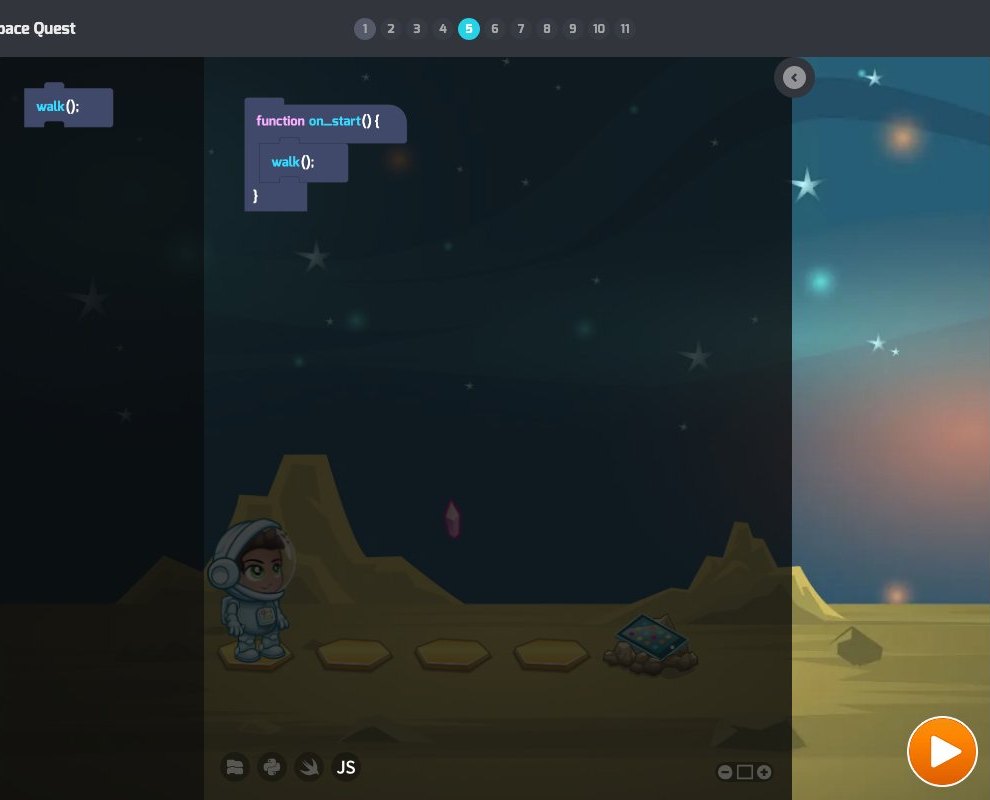
Tynker's JS button shows the walk block as JavaScript.Screenshot of Tynker's Space Quest Hour of Code activity in its JavaScript view, tynker.com, taken Nov 2, 2026.
// 🚀 THE HULL
makeRocket({ color: "blue" });

// 🌟 STARLIGHT SCANNER
every(1000, () => {
  spawnStar();
});
Change blue to red, or 1000 to 100, and press Run.
Press ▶ Run
That's Episode 1's real game engine, running your edit on this page.
No card needed. Episode 1, “Wake Up, Cody,” takes about 15 minutes.
The words are new, and the thinking is already theirs. Keep Tynker going if they love it. Star Catcher turns their block thinking into typed lines.
What happens in the first 15 minutes?
Your kid makes something happen within minutes on either one.
On Tynker, a kid can open an Hour of Code activity without an account.[6] We opened Space Quest on November 2, 2026. The kid picks a space cadet and watches a short crash landing. Then they snap blocks and press play to walk an astronaut across an alien landscape.[6]
In Codestronauts, Wake Up, Cody takes about 15 minutes. Pressing Run on a line already there wakes Cody. Bugs have eaten the ship, and one typed line builds it back.
A wrong line plays out on screen, often in a funny way. Then Cody points at it and explains why. The episode ends on a cliffhanger. If your kid wants Thruster Trouble next, they ask, and the yes is yours.
You give your email, a password, a PIN and your kid's first name. We email a link. Open it and pass your kid the screen, sound on. You need no card, and they need no email.
Sit beside the first ten minutes of each, then ask your kid to explain one line.
Is Tynker worth it?
Yes, if you want range. Its 30 electives include Minecraft modding, game design and an introduction to AI.[3] It says it has helped more than 100 million kids learn to code.[7]
Common Sense Media called it "a treasure trove for kids who are interested in learning to code".[4] One plan can carry a 6-year-old and a 12-year-old at once, each on their own account.[1]
How do the two feel different?
Tynker's kids snap blocks first;[2] ours type from the first line. Tynker's JavaScript 1 course is listed as advanced.[3] In Codestronauts, typing is the game. rocket.x += 10; slides the ship right.
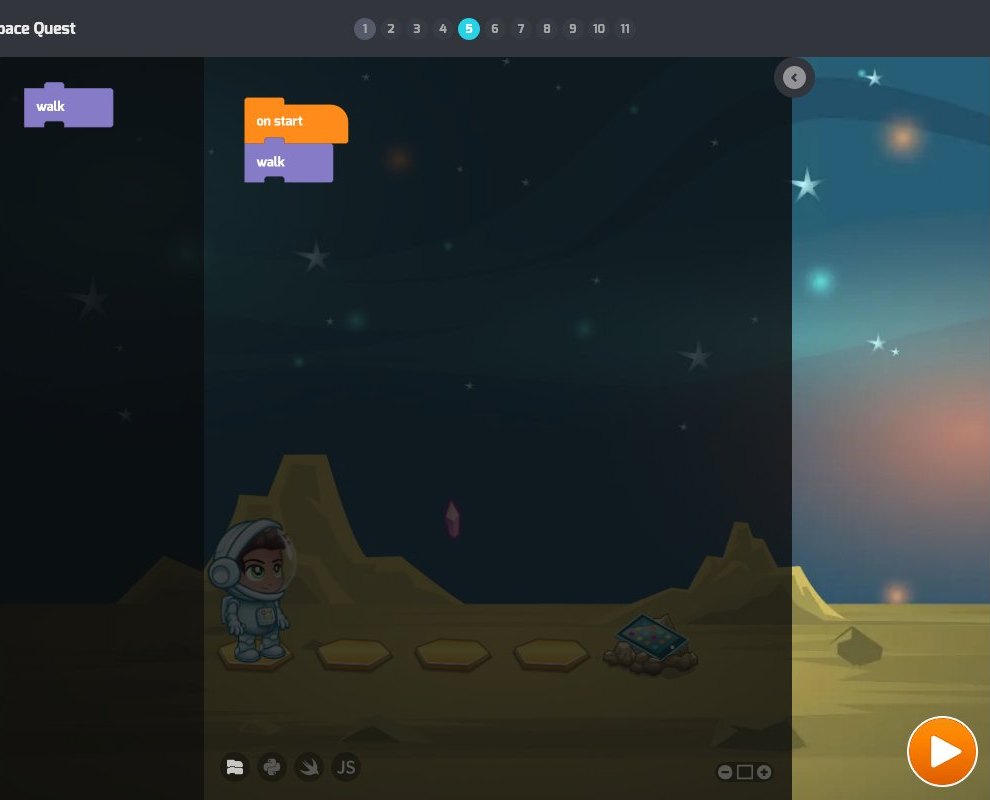
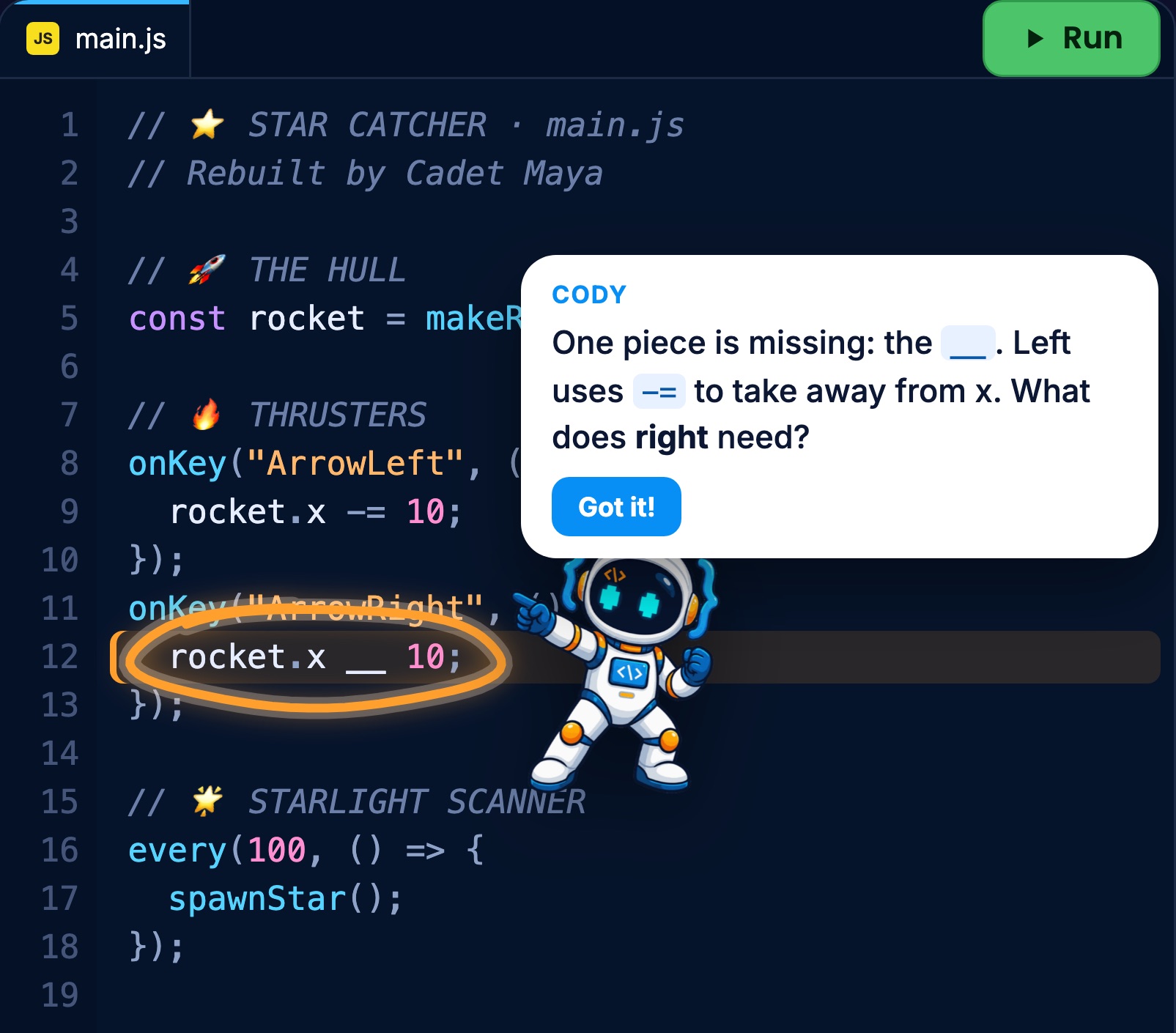
Both put the code inside the game. A block walks Tynker's astronaut, and a typed line flies our ship.
The second difference is who picks what's next. On Tynker, a placement test and six levels set the path, and electives are yours to pick.[1][3] In Star Catcher, the story does. Cody needs your kid to rebuild the ship, across all five episodes.
Questions parents ask
Can you use Tynker for free?
We already pay for Tynker. Should we cancel?
No need. Episode 1 is free beside it. If you bought on Tynker's website, open the parent dashboard, click "Manage" next to each child and select "cancel". If you bought in its iPad app, cancel in the iPad's settings.[1]
Which is better, Tynker or Scratch?
It comes down to fit. Scratch is free block coding for making your own projects.[8] Tynker is a paid path of courses.[1] See what comes after Scratch.
Does my kid need blocks before typing?
No. Episode 1 starts with pressing Run, and Cody explains each new word right after your kid sees it work. Block experience helps.
What comes after Star Catcher?
Constellation Painter, Mission 2. Kids redraw the star charts the Glitch erased, so the Starbase can navigate again.
Where Codestronauts fits
For the kid who wants a story to finish
We built Codestronauts around one story and a robot named Cody. In Star Catcher, each typed line moves the story on, up to a final battle against a boss your kid designed.
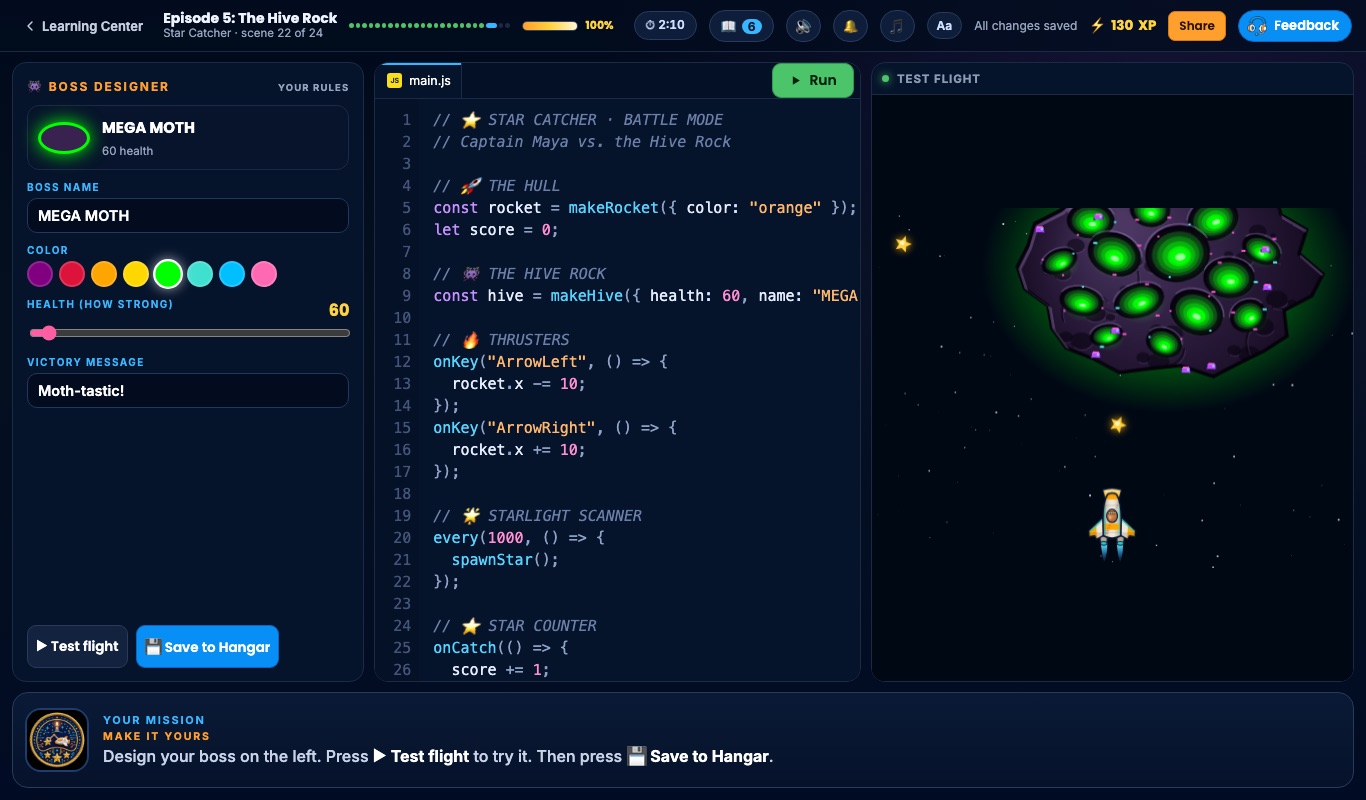
Every Codestronaut starts with Episode 1, and it's free. No card needed.
Was this answer helpful?
What was missing?
Tynker alternatives parents also weigh
Scratch Code.org CodeCombat Roblox Studio Coding tutor Coding camps Live coding classes Khan Academy CodeMonkey Kodable codeSpark Minecraft EducationAll fourteen side by side
From the blog
All answers CodingMy 10-year-old has outgrown Scratch. What should he learn next?Typed code, in a tool that keeps giving him things to show. Python is the usual answer, and a good one. For a ten-year-old game builder we'd pick JavaScript, because his games open in any web browser.
 Coding“My son can tell me what he clicked in coding class, but not why. I can't tell if he's learning anything.”Ask him to explain one line he wrote: what it does, and why it's there. If he can, he's learning. If he can only retrace the clicks, he's following steps.
How we compared
We make Codestronauts. We opened each product and took these screens on the dates shown. Each fact about the other program links to its own pages. Something out of date? Write to hello@codestronauts.com and we'll fix it. Tynker belongs to its owner, which has no tie to Codestronauts.
Sources
- Plans and Pricing | Tynker, Tynker. Read Nov 5, 2026 ↩
- Coding For Kids, Kids Online Coding Classes & Games | Tynker, Tynker. Read Nov 5, 2026 ↩
- Coding Curriculum for Kids | Tynker, Tynker. Read Nov 5, 2026 ↩
- Tynker: Parents' Guide (website review), Common Sense Media. Read Nov 5, 2026 ↩
- CodeHS Acquires Tynker to Expand K-8 Computer Science Learning Opportunities, CodeHS. Read Nov 5, 2026 ↩
- Space Quest: Hour of Code activity | Tynker, Tynker. Read Nov 5, 2026 ↩
- About Tynker, Tynker. Read Nov 5, 2026 ↩
- Scratch Foundation, Scratch Foundation. Read Nov 5, 2026 ↩
- Computer Science for Students | Learn, Explore, and Create with CodeAI, CodeAI (formerly Code.org). Read Nov 5, 2026
- About CodeCombat, CodeCombat. Read Nov 5, 2026
- Luau, Roblox Creator Hub. Read Nov 5, 2026
- Introducing Khan Academy's New Intro to Computer Science Course with Python, Khan Academy Blog. Read Nov 5, 2026
- Coding for Kids | Game-Based Programming, CodeMonkey. Read Nov 5, 2026
- Coding & Typing Apps for Kids Ages 4-10 | Kodable, Kodable. Read Nov 5, 2026
- codeSpark, the #1 Learn-to-Code App for Kids 3-10, Begin (codeSpark). Read Nov 5, 2026
- Computer Science | Minecraft Education, Minecraft Education (Mojang and Microsoft). Read Nov 5, 2026