How do I get my kid to create instead of just consume?
Short answer
Start from what they already consume and hand them its making twin: a stop-motion app for the YouTube kid, a game maker for the gamer, a comic for the reader.
Common Sense Media found that making things takes just 2% of tweens' screen time.1
Keep the first project to one evening, and give it an audience.
What does a weekend of "just consuming" look like?
It looks like a Saturday that leaves no trace. Breakfast in front of a YouTuber reacting to a game, then the game itself, then a video of someone better playing it, then a few dozen Shorts. Ask what they did today and you get "nothing." It's the day parents mean when they say all he does is consume: hours of other people's work and none of his own.
Autoplay is built to start the next video before anyone decides anything, so a day like that mostly happens to a kid. What's missing from it is one moment where your kid made something exist that wasn't there at breakfast: a drawing, a song, a level, a short film. The job is to add that moment, then let it grow.
How much of their screen time goes to making anything?
Almost none, and that's true of most kids. In Common Sense Media's 2019 census, kids 8 to 12 averaged just under five hours of screen media a day, and creating their own content took 2% of it,1 which is under six minutes. Watching, gaming and social media fill the hours, while making art, making music, coding and writing barely register.1
The census also holds a more hopeful number: close to two in three tweens and teens told the researchers they at least sometimes watch how-to videos on building, making or doing something they care about.1 The wish to make is already there. For now, your kid watches other people do it.
So the gap between a kid who uses technology and a kid who makes things with it is one learnable skill wide: knowing a making tool well enough to start without help. Eight is a fine age to learn it, old enough to read a tutorial and young enough to think trying something new is fun.
Does it matter if they mostly watch and play?
It matters for what they practice. A kid who only consumes gets very good at choosing, judging and skipping. What gets almost no practice is the other half: planning something, getting stuck in the middle, fixing it and finishing. The Child Mind Institute's specialists point out that when kids work on a project to fill their time, they have to make a plan, organize their materials and solve problems,2 the same muscles a long school assignment calls on later.
Over time it also shapes how kids see themselves. One who never makes anything decides making belongs to other people, like the YouTubers, the game studios and the kid in class who draws, and by 12 that can set into "I'm not creative."
All of this is fixable, and none of it is wired in. Kids this age already have strong opinions about what's good, which is where every maker starts. The payoff reaches past the project, too. Pooled studies of learning to code, one kind of making, found a medium-sized boost to thinking skills beyond coding itself,3 with the largest gains in creative thinking, math and reasoning.3
Why hasn't "go do something creative" worked?
Because each usual push asks a kid to leave the most polished entertainment ever made for a blank page, with nothing pulling them across. "Make something" is too big to start; for kids who turn down every idea, the Child Mind Institute suggests offering two choices and having them pick one.2 The craft kit from the birthday party stays in its box because the fun was decided in advance by someone else. A screen ban makes making feel like the punishment that replaced the good stuff. And at 10 or 11, the art supplies that thrilled them at 6 feel babyish.
What works at this age has four parts. It starts inside what the kid already loves, so a gamer makes a game and a YouTube kid makes a video. It uses a tool that feels grown-up. The first project ends the same evening, so the kid sees a finished thing before the urge runs out. And somebody is waiting for the result, whether that's a little sister, a grandparent or a character in a story. That last one matters most, because a reason to finish is what most kids are missing.
What can kids this age make, starting this week?
Match the making to the consuming. Each of these starts from a habit your kid already has, uses a tool that works at this age and has a first project that fits in one evening. Pick the two closest to what they love and offer those as the choice.
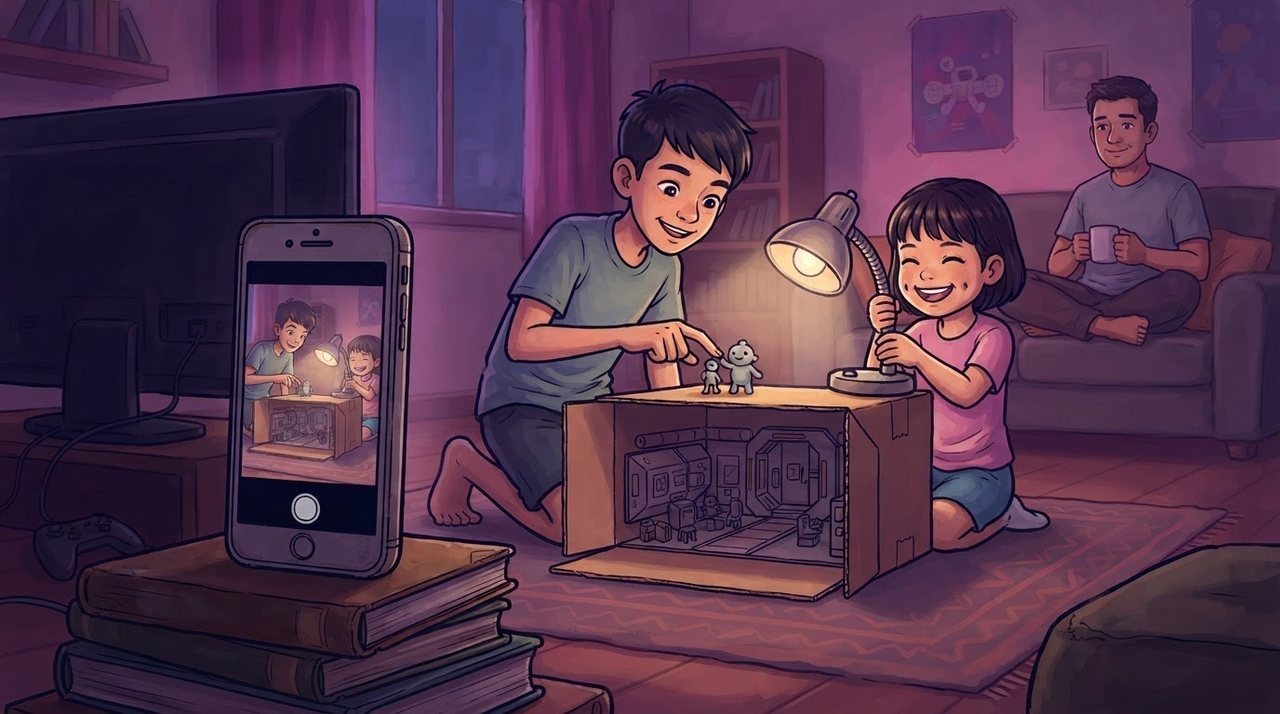
- Watches YouTube: a stop-motion film. A phone propped on a stack of books, a few Lego figures or a lump of clay, and a free stop-motion app such as Stop Motion Studio. First project: a ten-second scene where a figure walks in, sees something and runs. They learn to plan shots, and they find out how every video they watch is put together, one frame at a time. Good from 8.
- Reads comics and graphic novels: a comic or a zine. One sheet of paper folds into an eight-page booklet with a single cut. First project: a three-panel strip about something that went wrong this week, mailed to a grandparent. Kids who say they can't draw do fine with stick figures, because the joke and the timing carry it.
- Has music on all day: a beat or a song. Chrome Music Lab's Song Maker runs in a web browser without an account. Click squares on a grid and it plays them back as a loop. First project: a theme tune for a sibling's birthday, or for a game they love. GarageBand on a Mac or an iPhone is the next step up.
- Builds in Minecraft or with Lego: a cardboard machine. Watch the short documentary Caine's Arcade together, about a boy who built a cardboard arcade in his dad's auto-parts shop. Then build one working game for the family: a claw, a coin slot, a ramp with scoring holes. Boxes from the recycling, masking tape and a grown-up on the box cutter are all it takes, and it feels big at 10.
- Plays games: a game in Scratch. Scratch is free,4 runs in the browser and uses blocks that snap together, so an 8-year-old can get a sprite moving with the arrow keys in one sitting. First project: open someone's maze game, press See inside, change one thing and see what breaks.
- Lives in books: an interactive story. Twine is a free tool for choose-your-path stories, where each choice is a link to the next page. First project: a five-room haunted house with two endings, played by a parent at dinner. It's writing practice dressed as a game, and it suits the 11-year-old who reads under the covers.
- Binges story games and series: Star Catcher, from Codestronauts (ours). A space adventure where each line of JavaScript your kid types moves the story on. Their first typed line builds a starship, and the last episode leaves them with an arcade game they made. It's our course, written for this age, and the next section shows how it plays.
How do I make making a habit instead of a one-off?
Change a few house rules and keep the screens. None of these needs an app or a class:
- Make first, then watch. The first twenty minutes of screen time go to a tool from the list, and the rest is theirs. The hours stay the same, and the day opens with making.
- Pause the tutorial. When they watch a how-to video, stop it at each step and have them do that step before the next one plays.
- Ask the designer's question. About whatever they're watching or playing, ask what they would change. A kid who can say why a level feels unfair is halfway to building a fair one.
- Offer two, then wait. Give a choice of two projects and let a little boredom work. The Child Mind Institute says boredom can help kids develop skills, creativity and self-esteem.2
- Give making a home. A shelf near where they usually watch, with paper, tape, cardboard and a stand for the old phone, so starting takes seconds.
- Make next to them. Kids who say no to a project alone often say yes to doing it with you. Make your own version beside theirs, badly if you like.
- Book a premiere. Put a date on the finish: the film screens Sunday after dinner, the comic goes in Thursday's mail, a cousin plays the game on the weekend. Every finished thing tells your kid they're someone who makes things.
How does a YouTube kid turn into a maker?
Consider a 9-year-old we made up, who knows every Lego build video on YouTube by heart and hasn't opened his own Lego bin in a year. His dad leaves the videos alone. On Tuesday he props an old phone on a stack of books, tips the bin onto the floor and asks for a ten-second film by dinner, starring any minifigure the boy likes.
The first try is jerky, and the figure's head falls off halfway through. The boy finds this hilarious and keeps it in. By Thursday he's watching stop-motion tutorials with a different look on his face, pausing them to try each trick. On Sunday the forty-second film plays after dinner, and his sister demands a sequel. By the next weekend a shot list is taped above the Lego bin, and the videos he picks are the ones that show how to make a figure jump.
For the kid who wants a story and real code: Star Catcher
Star Catcher, the opening mission from Codestronauts, is a story for kids 8–12 built around this exact crossing from playing to making. It opens in an empty hangar where a robot named Cody has gone to sleep. Your kid presses Run on a line that's already there, and she wakes. The next line is theirs to type, makeRocket();, and it builds the ship. From then on every line of real JavaScript moves the adventure: they put the Star Catcher back together, teach it to fly, count starbits and race to get the Great Beacon shining again, and each episode breaks off at a moment that makes the next one hard to put off.
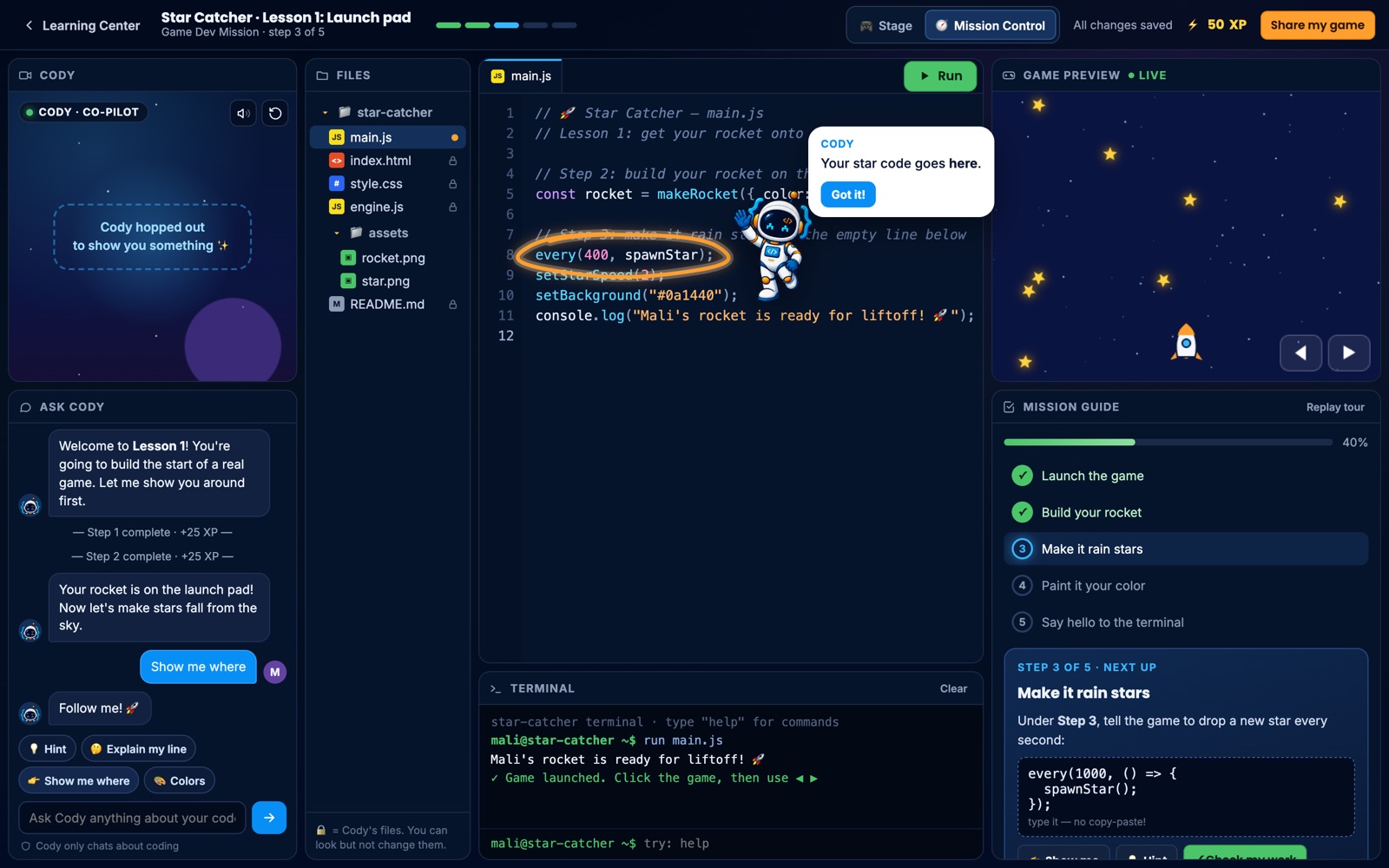
Cody is fully voiced, a little nervous and counting on your kid, so there's always someone waiting on the next line. When something breaks she circles the line to look at and offers a hint rather than the fix, and she steps back as your kid gets stronger. A mistake shows up as something going wrong in the story, often a funny one, and then she explains it. Five self-paced episodes, about two hours in all, end with what a pure consumer has never had: an arcade game of their own, steered with the arrow keys, keeping score, climbing levels, making sound, and ending on a boss they drew up themselves.
There's nothing to install; it runs in the web browser of the computer you already have. You own the account and approve every purchase from the Parent Corner, which sits behind a PIN. Kids see no ads and can't chat with strangers. All five episodes are $29.99, paid once and shared by brothers and sisters, with nothing to renew.
See the mission where your kid's first typed line builds a starship and the last one finishes a game.
See how Star Catcher worksQuestions parents also ask
Do YouTube tutorials count as creating?
Only once your kid makes the thing. Close to two in three tweens and teens say they watch how-to videos at least now and then,1 so use the habit: let them choose a tutorial, then pause it at each step and do that step before the next one plays. A tutorial followed one step at a time, mess and all, ends with something on the table.
My kid starts projects and never finishes them. What helps?
Shrink the project and set a date. An abandoned project was usually too big for the time a kid had, so cut the first one down to something that ends the same evening: one scene, one page, one level. Then give it a finish line someone else cares about, like a screening, a cousin who'll play it or a letter going out on Thursday.
Should my kid post what they make online?
At 8–12, share it with people they know instead. Most video and social apps set their own minimum age above this range, and a public comment section isn't the audience a first project needs. Show the film at dinner, send the comic to grandparents, play the game with a cousin on the couch. Family feedback is kinder and more specific.
Is 12 too late to start making things?
Twelve is a strong age to start. Twelve-year-olds can handle tools younger kids can't, like typed code, real music software and longer projects with a plan. What changes is the pitch: a 12-year-old wants to make something that looks real to their friends, so skip anything that feels like a craft kit.
Was this answer helpful?
What was missing?
Sources
- The Common Sense Census: Media Use by Tweens and Teens (2019), Common Sense Media ↩
- The Benefits of Boredom, Child Mind Institute ↩
- Some Evidence on the Cognitive Benefits of Learning to Code, Frontiers in Psychology (Scherer, Siddiq and Sánchez-Scherer, 2021) ↩
- Scratch Foundation: helping kids everywhere create what they imagine, Scratch Foundation ↩
Keep reading
More in Screens and gaming MotivationMy 9-year-old is always bored. What should I do?A 9-year-old who is always bored usually has too little in the day that fits their level or matters to them. It's worth catching now.
 ScreensMy 10-year-old only wants to play video games. Should I worry?Usually not. Loving games at 10 is normal, and most kids who game never develop a problem.
 ScreensMy son used to build Lego for hours. Now he only wants screens.He's still a builder. Screens won because games and videos of other people playing feel easier than making something, and toys don't have autoplay. So give the builder a screen job: worlds to construct, games to code.
 ScreensHow much screen time is OK for a 10-year-old?A sensible start is one to two hours of fun screen time a day, homework aside, as Nemours KidsHealth suggests.