My son has coding lessons in Grade 3 at his Thai school. What is he actually learning?
Short answer
Mostly how to solve problems in clear steps, with some programming.
Computing science has been compulsory in Thai schools since 2018,1 and Grade 3 has five targets: showing an algorithm, writing and debugging a simple program, searching online, presenting data and using technology safely.2 Coding is "just one part" of it, curriculum developer Asst. Prof. Sukree Sinthupinyo said in 2019.3
Should a Grade 3 kid really be writing loops already?
Yes, and you're not the only parent caught off guard. He comes home talking about a maze level, a cartoon bird he steered with a block that says repeat, and a loop he put inside another loop. You remember school computers as the place you learned to search the web. One Pantip poster put that feeling into a thread title in 2021: "Really shocked: nowadays Grade 3 kids have to learn coding. Back in my day, first-year university still only taught Google and IE." The Grade 3 kid they asked about was on Code.org writing conditions and "loops inside loops".4
It's on the national timetable for every child. Computing science (วิทยาการคำนวณ) became part of Thailand's science curriculum in 2018, and two Chiang Mai University researchers, Wichaya Pewkam and Suthida Chamrat, put it in one line in a 2022 paper: it "has been a compulsory subject in the Thai science curriculum since 2018."1 It starts in Grade 1. Asst. Prof. Dr. Sukree Sinthupinyo of Chulalongkorn University's computer engineering department, one of the subject's curriculum developers, described the first lessons to The Standard in 2019: "From Grade 1 we teach them to use command cards, step by step. Walk straight five steps, then turn right, then turn left."3 By Grade 3 the same idea can move onto a screen, as it did for the kid in that thread.
What exactly is on the Grade 3 list?
Five things, and only two of them are programming. The 2017 revision of the national core curriculum lists five indicators for computing science in Grade 3 (Prathom 3):2
- Show an algorithm. Lay out the steps of a task or a simple problem with pictures, symbols or words (แสดงอัลกอริทึมในการทำงาน หรือการแก้ปัญหาอย่างง่าย).
- Write a simple program and find its bugs, using software or other media (เขียนโปรแกรมอย่างง่าย … และตรวจหาข้อผิดพลาดของโปรแกรม).
- Search the internet for knowledge.
- Collect, process and present data with software.
- Use technology safely and follow the agreed rules for the internet.
An algorithm at this age can be as plain as getting ready for school in the right order. "Software or other media" covers a lot of ground: paper command cards, a block tool on a computer, a floor robot. That's why two Grade 3 classes can look so different. Sukree said the curriculum is written broadly on purpose, and each school fits it to its own setting.3 As for time, one teacher course built on the curriculum plans Grade 3 computing science as 20 hours a term,2 but it varies by school, so ask the teacher how many periods it gets at your son's.
Is the school trying to turn him into a programmer?
No. Sukree, who helped write the textbooks for Grades 1 to 6, was blunt about it in 2019: the content "isn't meant to make children programmers."3 The subject has three parts: computational thinking, digital technology basics, and media and information literacy.3 Coding sits inside the first. In his words, "the part called coding is just one part of computational thinking."3 Programming itself isn't new in Thai classrooms either: an introduction to BASIC was in the Ministry of Education's curriculum as early as 1985 (B.E. 2528).3
What the school is after is a habit. Break a job into steps, put them in order, run them, and when the result is wrong, look for the one step that broke instead of deciding the whole thing is hopeless. Sukree tied it to life off the screen: sometimes a child's trouble is one small bug, and once they debug it, the problem can be solved.3 The youngest grades always begin unplugged, with no computer at all.3 The loop your son wrote is the part of a thinking lesson you can see.
What comes in Grades 4 to 6, and what if he decides he hates it?
The same ideas, built step by step into real programs. In Grade 4, pupils use logical reasoning to explain how something works and predict the result of a simple problem, and they design, write and fix simple programs.5 In Grade 5, their programs have to check conditions that cover every case, such as one that tells odd numbers from even ones.6 By Grade 6 they design and write programs with variables, loops and condition checks.7 The tools named are Scratch and Logo, and the sample problems include a game, a lowest-common-multiple finder and a typing game.7 They also practise finding bugs in other people's programs, which the course says sharpens the skill of tracking down what caused a problem.7
Each year leans on the one before, so how your son feels about Grade 3 matters more than his Grade 3 mark. A boy who only ever meets loops as a worksheet with a score at the bottom can decide at eight that he's "not a computer person", and carry the label into the year variables arrive. The Standard's writer named the same risk in 2019: taught without real understanding, the subject can leave pupils with a bad attitude toward it for a long time.3 That label costs more than any one test.
This is fixable, and Grade 3 is an easy time to fix it. The ideas on the list are small: steps in order, a block that repeats, a bug found and fixed. A kid who has already made a loop do something he wanted, just for fun, walks into the test knowing what a loop is for.
Does he need a coding tutor on top of school?
Usually not yet, and the usual add-ons can make it worse. A tutoring centre's extra worksheets turn the one subject that should feel like play into a second homework. Memorising the textbook's definitions for the exam earns a mark and fades by the next term. Leaving it all to school means a few short periods and a teacher who can't sit beside every child at the moment his loop goes wrong. Teachers are learning the subject too: asked about their readiness in 2019, Sukree pointed to the large amount of teaching media and teacher guides IPST, the curriculum's author, had already produced.3
What works at eight is changing the order. If the worksheet is where he meets a loop for the first time, the idea and the mark arrive together, and the mark is what he remembers. Let him meet each idea first at home, where nothing is marked and his own instructions make something happen on the spot, and the worksheet becomes a recap of something he already owns. Sukree compared code to learning a language, where children read and understand before they write.3 His worry in 2019 was the hours after school: the country lacks places where children can spend time chasing their dreams, he said.3 For most families, home is the nearest one.
What can we do at home this week?
Start with what the school is using, then play. None of this needs you to know any code.
- Find out the platform. Ask the teacher, or your son, what the class works in and how many periods it gets. If it's Coding Thailand, the Digital Economy Promotion Agency's site for the subject, there's a room for each primary grade, Grade 3 included, and it's described as "a learning platform for the computing science subject, for every young Thai person."8
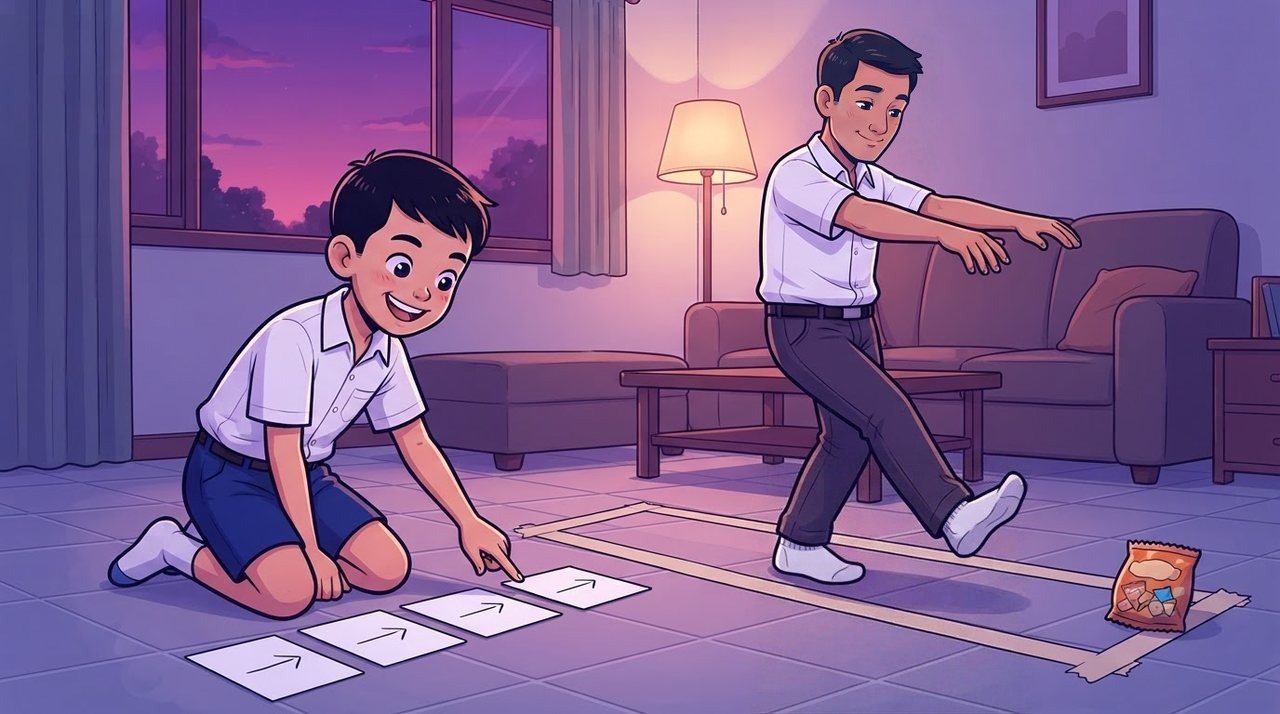
- Play "be the computer". Draw arrow cards (forward, turn left, turn right) and lay a tape path across the floor to a snack. He writes the program in cards, you follow it exactly, and when you walk into the sofa he finds the bug. It's the Grade 1 command-card lesson Sukree described, played at home.3
- Add a repeat card. Once he's tired of laying down four "forward" cards, hand him a card that says "×4". That card is a loop, and he'll know exactly why it exists.
- Go on a loop hunt. At dinner, find the loops in the day: stirring the pot ten turns, brushing each tooth, a song on repeat. Ask what would happen if one never stopped.
- Hand him your bug. Write a card program with one mistake in it on purpose and let him fix yours. Finding bugs in other people's programs is on the Grade 6 list anyway.7
- Agree the screen rules together. Safe internet use and agreed rules are on the Grade 3 list,2 so write your family's three rules for the laptop with him and stick them by the screen.
- Keep it short and unmarked. Stop while he still wants one more round, and never give a score.
What could that look like for one Grade 3 boy?
An example, with an invented boy. Ohm is eight, in Prathom 3 at a government school in Khon Kaen, and his computing sheet comes home with a maze, a row of empty arrow boxes and a mark of 6 out of 10. He got every turn right and forgot the bird had to move twice. He announces that computing is boring.
His mum skips the extra worksheet. On Saturday she runs masking tape across the tiles, puts a bag of shrimp crackers at the end and lets him program her. On his first try she walks into the fridge. He laughs so hard he has to sit down, finds the missing step, and by the third run invents a card of his own with "×3" on it, because writing forward three times is boring.
On Monday the maze sheet has a new box marked repeat. He fills it in before the teacher explains it, then asks for a spare sheet to draw a maze his mum has to solve with cards that evening.
Codestronauts: the school habits, played at home in real code
Codestronauts is built for children 8–12 and wraps its coding inside a story; Star Catcher is where it begins. It sits beside the school subject without repeating it. At school your son lays out steps and hunts bugs for a mark. Here the same habits play out in a space adventure with no worksheet in sight. In Episode 1 he presses Run on code that's waiting on the screen, and Cody, a jittery robot who has been asleep in an empty hangar, wakes up. The very first code he types on his own builds the ship. From then on, every line he writes pushes the adventure forward, and every episode, five in all, closes on a cliffhanger.
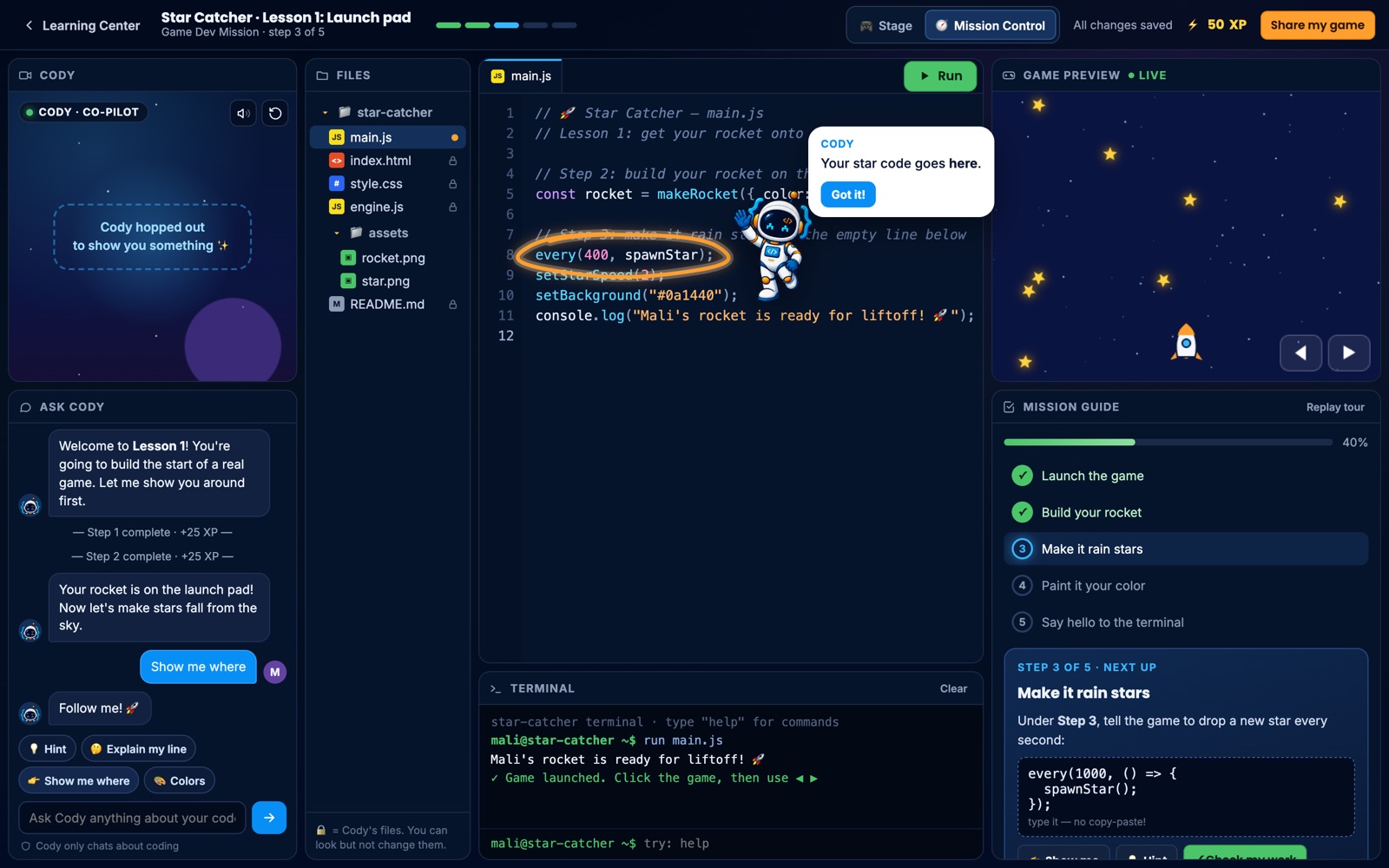
He types real JavaScript from the first night, never dragging blocks, and whenever a new word appears, Cody explains it once he has watched it do its job. A wrong line goes wrong on screen, often comically, and Cody points to the line with a hint, never the answer. She steps back a little more each time he gets better. Over about two hours, at his pace, he rebuilds the Star Catcher, relights the Great Beacon and ends up with an arcade game he made himself, with arrow-key controls, a score that climbs, levels, sound effects and a boss of his own design. Any laptop or desktop browser runs it, phones too, and there's nothing to install. You own the login, and a PIN guards the Parent Corner, where you approve every purchase and can see each step he takes. Nobody he doesn't know can message him, and no ads appear. A single $29.99 payment covers all of Star Catcher, there's no subscription, and a younger brother or sister can play on the same purchase.
See the mission your son would start on, from the first press of Run to the boss he designs.
See how Star Catcher worksQuestions parents also ask
Is Grade 3 too young to learn coding?
No. The national curriculum starts in Grade 1, with command cards children follow step by step, before any computer comes in.3 By eight, most of what a beginner needs is the habit of putting steps in order and checking the result. A child who can type a little can go further and start on real typed code, as long as each new word is explained the moment it appears.
Does my son need a computer at home to keep up?
Not to keep up. Sukree said children can read and write code on paper at a basic level, and a computer becomes necessary when they want to see the result.3 The card games on this page need only paper and tape. A laptop at home matters once he wants to build something that runs.
His class uses blocks. Is that real coding?
Yes. Blocks hold the same ideas, order, repeats and conditions, without spelling mistakes getting in the way, and the Grade 3 indicator asks only for a simple program written with software or other media.2 Typed code is the next step: the same ideas written as words, the way professional programmers write them. From eight or nine, a child who can type a little can start writing them.
What if his school barely seems to teach it?
Was this answer helpful?
What was missing?
Sources
- Pre-Service Teacher Training Program of STEM-based activities in Computing Science to Develop Computational Thinking, Informatics in Education, 2022 (Wichaya Pewkam and Suthida Chamrat, Chiang Mai University) ↩
- ตัวชี้วัดและสาระการเรียนรู้แกนกลาง รายวิชาวิทยาการคำนวณ ป.3 (Grade 3 computing science indicators, 2017 revised core curriculum), Teacher e-learning on IPST's computing science curriculum (168training.com) ↩
- รู้จักวิชาแม่ของ Coding ในระบบการศึกษาไทย กับคำตอบที่มากกว่า 'ไม่ใช้คอมฯ ได้จริงหรือ', THE STANDARD, 2019 (interview with Asst. Prof. Dr. Sukree Sinthupinyo, Chulalongkorn University) ↩
- ตกใจมาก เดี๋ยวนี้เด็ก ป3 ต้องเรียนเขียน coding แล้ว สมัยก่อนเข้าปี 1 ยังแค่สอนใช้ google IE อยู่เลย, Pantip (a parent's question, 2021) ↩
- วิชาเทคโนโลยี (วิทยาการคำนวณ) ป.4 ตัวชี้วัดและสาระการเรียนรู้ (Grade 4 computing science indicators), Teacher e-learning on IPST's computing science curriculum (168training.com) ↩
- วิชาเทคโนโลยี (วิทยาการคำนวณ) ป.5 ตัวชี้วัดและสาระการเรียนรู้ (Grade 5 computing science indicators and content), Teacher e-learning on IPST's computing science curriculum (168training.com) ↩
- วิชาเทคโนโลยี (วิทยาการคำนวณ) ป.6 ตัวชี้วัดและสาระการเรียนรู้ (Grade 6 computing science indicators and content), Teacher e-learning on IPST's computing science curriculum (168training.com) ↩
- CodingThailand: เรียนวิธีคิด ผ่านวิธีโค้ด, Coding Thailand (depa, the Digital Economy Promotion Agency) ↩
Keep reading
More in School and learning School“We live in Bangkok, and I want my child ready to compete with kids from every country.”Give them a few things that count in any country: English they use for real, a belief that effort pays, and a skill judged the same everywhere, like code.
 CodingI'm not technical. How can I help my child learn to code?You can help without knowing any code. Let a good course do the teaching and make yourself the audience: ask your child to show you how their program works, and praise the effort.
 CodingMy 8-year-old spends hours on huge Minecraft builds. Is he old enough to learn real coding?Yes, if his typing is ready. The Raspberry Pi Foundation sets typed code at "around the ages of nine or ten" because that's when "typing skills are often sufficient".
 SchoolMy 9-year-old can swipe through an iPad but can barely type on a laptop. When should kids learn to type?Start now. "Most research supports starting students on formal keyboarding around grade 4," says occupational therapist Theresa Tovey, and fourth-graders are 9 or 10.