My son wants to make his own video game. Where should an 11-year-old start?
Short answer
Start with one small game he can finish this month, in real typed code that runs in a web browser, such as JavaScript, plus a reason to come back when week two gets hard.
Eleven is an early start.
In Stack Overflow's 2019 survey, about four in five developers wrote their first line of code at 12 or older.1
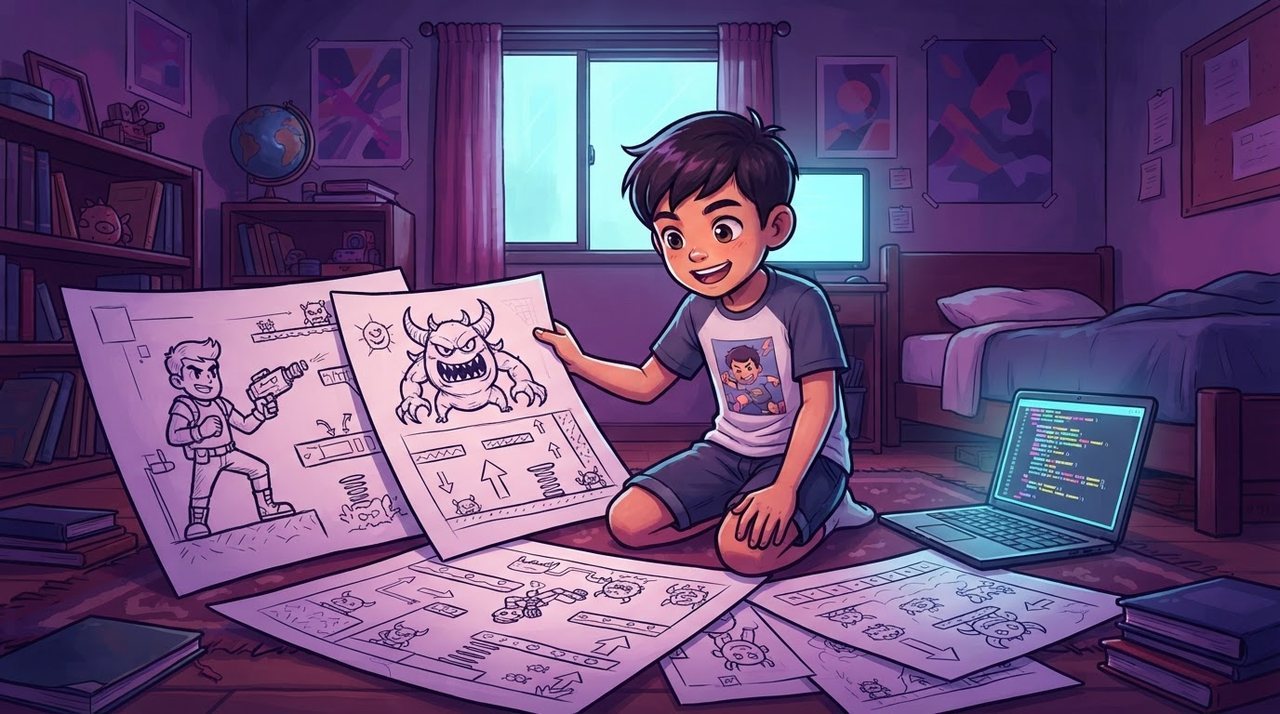
He has the whole game planned. Where do we even begin?
Begin with his idea, before any software. The idea will be huge, and the first job is making it small enough to finish.
It usually starts with a notebook. He wants to make his own video game, and he has already designed it: twelve levels, a dragon boss, a shop, and online multiplayer so his friends can join. Then he asks if he can start tonight. You search "how to make a video game" and get Unity, Unreal, Godot, C#, Python, Lua, Scratch, Roblox Studio and a dozen camps, each sure it's the right first step. You can't tell which ones are built for studios and which for kids. And if you don't code yourself, you already know you can't help him when he gets stuck.
Every tool on that list can make a game. The right one for an 11-year-old gets a small version of his game moving on screen in the first evening, in code he can keep growing into. It also has to give him a reason to come back on the evenings when nothing works.
Is 11 a good age to start?
Yes, and an early one. In Stack Overflow's 2019 developer survey, 8.7% of the developers who answered wrote their first line of code before age 10 and 9.8% at 10 or 11, so about four in five started at 12 or older.1 Your son would be starting earlier than most of them did.
He also has what typed code asks for. If he reads chapter books and types his own messages, he can type real code, and at 11 he'll want tools that feel like the real thing. And he brings the one part a parent can't supply, which is wanting to make something. What he's missing is a workshop. For games, the workshop is code, and it runs on the laptop you already own.
What's left to solve is his first month. That's where the idea either becomes a game he can play or turns into one more plan in a notebook.
What happens if his first try goes badly?
Most often he decides he's "not a coding person" and goes back to playing. That's a real loss, and it's very avoidable.
First game projects tend to stall in one of two ways. Either the game is too big (the notebook version, with its dragon and its multiplayer) or the tool is too big (a professional engine where the first evenings go to installing and clicking through menus). Both end with a wall in week two and nothing of his moving on screen. At 11, he's more likely to blame himself than the tool.
What's on the other side of that wall is worth the push. Researchers who pooled the experiments on learning to code found its biggest carry-over into creative thinking, mathematical skills, metacognition (thinking about his own thinking), reasoning and spatial skills.2 A finished game is also proof, to him, that his ideas can turn into real things.
Both failures are fixable. A first game small enough to finish takes care of the first one, and a reason to come back when the code fights him takes care of the second.
Why don't the usual first steps work for an 11-year-old?
Each one misses something an 11-year-old needs: a tool his size, a reason to keep going, or the part where he learns how it works.
- Downloading Unity or Unreal, the engines behind commercial games, means his first evenings go to installs and menus before anything he made moves.
- A video tutorial series has him copy code that runs, and then he can't change it, because nobody explained why it worked.
- Block apps are great at 8. At 11 plenty of kids find them babyish, and many of the rest outgrow them once they want a game that looks real.
- A camp or weekly class is fun while it lasts, then it ends, and nobody at home knows how to pick up where it stopped.
- Roblox Studio teaches real code (Lua), and a kid who loves Roblox arrives motivated, but it's a big 3D tool inside a platform where chat and spending are a click away.
- An AI game maker can turn his description into a playable game quickly. The AI did the making, though, so he ends up with a game and very little of the skill to build the next one himself.
What works at 11 is a first game small enough to finish, plus a reason to come back when the code fights him. The reason can be a friend waiting to play, a playtest he promised, or a story he wants to see the end of. Story has been tested with kids learning to code.3 Caitlin Kelleher, Randy Pausch and Sara Kiesler compared middle school girls learning to program with two versions of the Alice programming tool, one built for creating 3D animated stories and one without the storytelling support.3 Both groups learned the basic programming ideas equally well.3 The girls making stories spent 42% more time programming and were more than 3 times as likely to sneak extra time on their programs.3 Whatever the reason is, its job is to keep him at the keyboard long enough to get past the bug.
What can we do tonight?
Shrink the idea, pick one tool for the month, and put the sessions on the calendar. None of it needs you to know how to code.
- Get the game into one sentence. Ask him to describe his game in a single sentence, then find the smallest version that's still fun: one screen, one thing he controls, one way to score and one way to lose. "A knight dodges a dragon's fireballs while the score climbs" is a first game. The dragon saga goes in the notebook under "Game 2", so he knows it's saved.
- Draw it before he codes it. One sheet of paper shows what's on the screen (game makers call these sprites), which keys do what, how the score goes up and what ends the game. That sheet becomes his to-do list.
- Pick one tool for the month, by where he's starting. If he has never coded, a weekend with Scratch, which is free and runs in the browser, teaches the ideas fast before he moves to typed code. If he wants real code, start with JavaScript, which runs in the browser of any laptop; a free browser editor such as the p5.js web editor needs nothing installed. If Roblox is his whole world, Roblox Studio and its Lua will hold his interest; set up the chat and spending controls together before he starts. If Minecraft is his world, command blocks let him change a world's rules from inside the game. Save Unity, Unreal, GameMaker and Godot for after he has finished a game or two.
- Let version one look rough. Ready-made art or plain shapes are fine, so week one goes to making things move instead of drawing them.
- Book three short sessions a week. Half an hour each, on the same days, the way he'd practice a sport.
- Hold a playtest at the end of week two. The family plays version one while he watches and writes down every bug and every "whoa". Then he picks one bug and one new idea for the week after.
If a tool still isn't clicking after a month, switch without making it a big deal. Finishing one small game matters more than which tool he finished it in.
What does a good first month look like?
Say the notebook game is the dragon one, with twelve levels, a shop and online multiplayer. In week one it shrinks to one screen: a knight at the bottom, fireballs dropping from a dragon at the top, and a score. By the end of his second session the knight dodges left and right when he presses the arrow keys, and he makes everyone in the house come and look.
Week two is the hard one. The fireballs pass straight through the knight, he can't see why, and on Wednesday he says he's done. What brings him back is the reason he lined up in advance, like the playtest he promised a friend for Saturday or the next part of a story he's in the middle of. He finds the typo on Thursday. One missing letter.
By the end of the month his family has played version one more times than anyone can count, and the notebook is open to the page with the shop on it. A first month that ends with one finished game and a kid who knows he can make the next one has done its job.
Where Codestronauts fits
Codestronauts builds both halves of that first month into Star Catcher, its first mission for kids 8–12: a game small enough to finish, inside a story strong enough to carry a boy like yours through week two. It runs in the browser of the laptop you already own, with nothing to install. In the first episode he presses Run on a line that's already there, and Cody, a nervous robot co-pilot, wakes up. The first line he types himself is "makeRocket();", and it builds their ship. From there the two of them rebuild the Star Catcher one line of real JavaScript at a time. Every line he writes pushes the adventure forward.
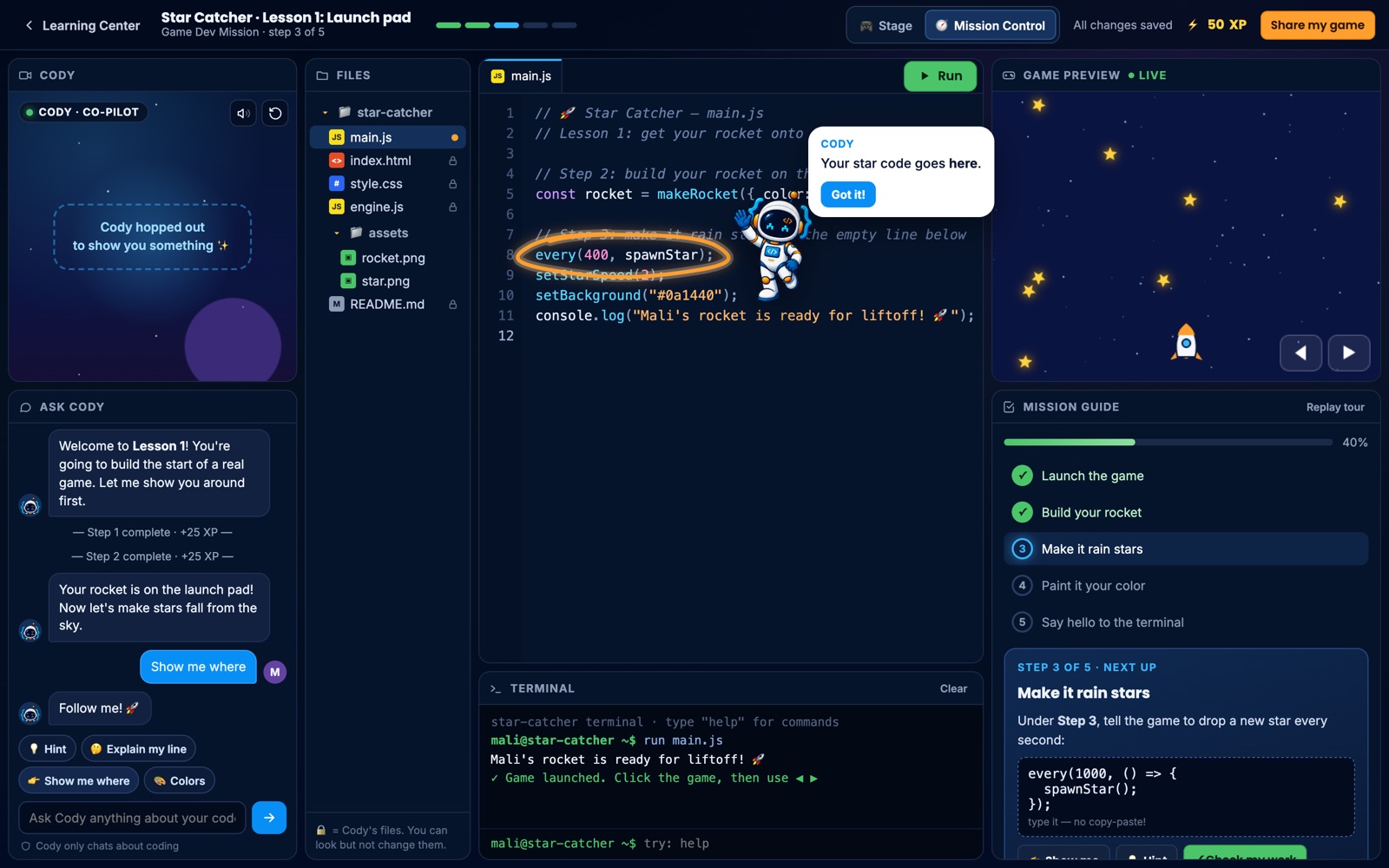
In Thruster Trouble, the second episode, he teaches the ship to fly. Each episode ends on a cliffhanger, which gives him a reason to come back for the next one. A wrong line shows him exactly what it does inside the game, which is often funny, and then Cody tells him why it happened. She drops hints, puts a finger on the line worth a second look, and lets him do more on his own as he improves. The mission runs five episodes at his own pace, roughly two hours of play. By the last one he has an arcade game that's all his: he steers with the arrow keys, chases a score through levels with sound, and faces a boss he designed himself. The account is yours, and the Parent Corner that runs it is locked with your PIN. You pay $29.99 once for the whole mission, and his brothers and sisters can play it too. After that the notebook game gets its turn, and he comes to it with a finished game behind him.
See the mission, the ship he'll rebuild and the game he'll finish with.
See how Star Catcher worksQuestions parents also ask
Can he start by modding Minecraft?
He can start inside it. Command blocks change how a Minecraft world behaves without installing anything, and they teach the if-this-then-that thinking every game runs on. Add-ons for the Bedrock Edition are scripted in JavaScript, so a JavaScript start carries straight over. Mods for the Java Edition are written in Java and need a full developer setup, so save those for after his first finished game.
Should his first language be JavaScript, Python or Lua?
For a first game, JavaScript. It runs in every web browser, so the first thing he makes can be moving on screen that same evening. Python is a clean first language too, though games in Python need an add-on (Pygame) and some setup. Lua is the right pick if he's set on Roblox Studio. C# and C++ belong to Unity and Unreal, and they can wait until his third or fourth game.
Is Roblox Studio a good place for an 11-year-old to start?
It can be, if Roblox is where his friends are. The Lua he writes there is real code, and his friends can play what he builds. It's also a big 3D tool on a platform with chat and in-game spending. Turn on Roblox's parental controls with him first, and keep his first project as small as a single obstacle course.
What's my job if I can't help with the code?
Think of yourself as his producer. Help him shrink the idea, protect the sessions on the calendar and play every version he makes. When he's stuck, ask what he expected to happen and what happened instead; saying it out loud often turns up the bug. Once a week, ask him to show you one line he wrote and what it does.
Can he make games on a Chromebook or an iPad?
A Chromebook handles anything that runs in a browser, including Scratch and JavaScript editors. On an iPad, add a keyboard, because typing code on glass gets old fast. Roblox Studio, Unity and Unreal are installed desktop programs, made for full computers rather than Chromebooks or iPads.
Was this answer helpful?
What was missing?
Sources
- Stack Overflow Developer Survey 2019, Stack Overflow ↩
- Some Evidence on the Cognitive Benefits of Learning to Code, Frontiers in Psychology ↩
- Storytelling Alice motivates middle school girls to learn computer programming (Kelleher, Pausch and Kiesler, CHI 2007), WashU Research Profiles ↩
Keep reading
More in Coding and making CodingMy 10-year-old has outgrown Scratch. What should he learn next?Typed code, in a tool that keeps giving him things to show. Python is the usual answer, and a good one. For a ten-year-old game builder we'd pick JavaScript, because his games open in any web browser.
 CodingI wish I'd learned to code as a kid. Where should my child start?Pick by what your child can type and wants to make. Not typing yet: Scratch or a free Code Club. Into games: MakeCode Arcade, or Star Catcher, our typed-JavaScript story. From about 9 or 10, Python or web pages.
 CodingMy 10-year-old daughter loves building things but says coding is for boys.Act now, while the idea is new. In Microsoft's survey of 11,500 European girls and young women, most girls' interest in STEM took hold around age 11½ and began to fade by 15.
 ScreensHow much screen time is OK for a 10-year-old?A sensible start is one to two hours of fun screen time a day, homework aside, as Nemours KidsHealth suggests.